Feedback for v4.4.1 and v4.4.2

Same here, on Pixel 4a:

  1. was at 4.2-a1620260814…, updated OTA this morning to 4.4.2
  2. reboot got stuck @ Google logo
  3. power-volume_down’d to fastboot
  4. adb devices shows device in fastboot
  5. fastboot getvar current-slot shows slot is “b”
  6. fastboot --set-active=a; fastboot reboot
  7. Stuck again on Google! Just like you,@loserkid
  8. fastboot getvar current-slot shows “a”
  9. fastboot --set-active=b
  10. fastboot reboot
  11. works! I’m somehow back 4.2

Will think twice about accepting update. Otherwise, this /e/os 6-week convert is happy w/ app choice and privacy, and with battery life.

2 Likes
  1. Vendor name: Fairphone

  2. Device name: Fairphone 5

  3. Device codename: FP5

  4. Previous version: /e/OS v4.4.1

  5. Current version: /e/OS v4.4.2

  6. Device state: Boot-locked, not rooted.

Upgrade over WiFi was a bit slower than previously, but no issues.

Advanced privacy hide IP is prudently locked not to activate as it has some bug probably currently under fixing.

Unlike earlier now my Tor browser over Open VPN for Android, VPN server in France, tor gateway in the Netherlands, works fine.

  • Vendor Name: Sony

  • Device name: XA2

  • Device codename: H3113

  • Previous version of /e/OS or stock ROM: 4.3

  • Whether the device is rooted or not: rooted

  • Issue/ Error: Internal Camera Error after Update to 4.4.2. Camera (both, front and rear) without Funktion.

Exactly the same here. On Pixel 4a, was on 4.2-a16-20260814662908-community-sunfish.
Updated OTA this morning to 4.4.2. Got stuck.
Went back to 4.2

1 Like

On my GS6 running /e/OS 4.4.2, The timer runs correctly.

1 Like

Tout semble OK.
Merci

So, on the grey tile it is showing time counting down?

Yes, here working too. GS6, /e/OS 4.4.2

Yes it shows the time counting down.

I use it every day as a cooking timer.

Almost same issue on Pixel 5:

  1. Google
  2. Pixel 5
  3. Redfin
  4. e-4.2-a16-20260815662914-community-redfin
  5. not rooted (bootloader unlocked)

Updating to e-4.4.2-a16-20261027700349-community-redfin ended up in recovery. After several bootloops it switched back slot and booted in 4.2 .

Issue also occured with the (only during a short time available) 4.4.1.

Issue also occurs updating via ADB sideload.

Thanks for your work - hoping you can identfy the issues.

Same here, I do the same, but mine is broken… on the tile it says ‘clock’, only on the timer option in clock app showing the countdown… I clesred cache and data, still the same.

1 Like
  • Vendor Name: Murena
  • Device name: Fairphone 6
  • Device CodeName: FP6
  • Version of /e/OS or Stock which existed previously: 4.3-a16-20260917677552-official-FP6
  • Is the device Rooted / Not rooted: not rooted
  • /e/OS update to: 4.4.1-a16-20261021695349-official-FP6 → 4.4.2-a16-20261027699881-official-FP6

Update from 4.3 to 4.4.1 then 4.4.2

Quick OTA update whithout problem.

New issue
Unable to assign a Google account to App Loundge. When the assignment is validated, the application closes and the Google account is not assigned.
I tried to clear the data and App Loundge cache, delete the Google account from the phone, redefine it, and assign it, but without success.

The issue with the Pixel 4a had already been reported for 4.3. Then 4.4.1 was released without a fix which is not a big deal in general, but the update shouldn’t be advertised if the issue is still unfixed.

Then 4.4.1 was rolled back for Pixel 4a, which again was invalidated by releasing 4.4.2 which is still unfixed and still seems to get pushed to users now.

Is it somehow possible to carry the “rolled back” status along with upcoming releases until the device has actually been tested good and explicitly marked as “should receive updates again”?

It’s really dissatisfying to see OTA updates being published that are actually known to cause failures and people stumbling over the same issue again and again.

Thanks everyone involved for their work!

1 Like

Are there no experiences with 4.4.2 yet? Especially with FP6 would be of interest to me.

  • Vendor name: Murena
  • Device name: Murena One
  • Device codename: one
  • Previous version of /e/OS: I guess it was 4.4.1-s as I update it regularly. Sure it was Android 12

It’s a big change moving from Android 12 to Android 15, but this has caused two issues:

  1. The device is now sluggish.
  2. The battery drains much faster. It used to last up to a day and a half on a single charge, but now it’s down to 50 per cent in half a day. There must be some internal process that’s draining the battery.

There were also some issues with the update. For several hours, the message ‘Initializing…’ remained on the screen, but the launcher did not appear. Fortunately, I was able to access the settings menu. The only way I think I solved the problem was by disconnecting from Wi-Fi. Confirmation that this also happens when rebooting.

1 Like

I second that
@Manoj I did not find any feedback in the forum for an issue-free sunfish-version higher than 4.2
Why is it still made available via ota?

1 Like

Same for my 4a. Staying on 4.2 for now

does anyone have issues completing the setup-wizard after a factory-reset as this users ?

Fairphone 6 with stock e-OS from Murena.
Update 4.4.2.

The update went quickly and smoothly.

Since the update, the Body Battery feature in Garmin Connect hasn’t been working correctly. It only shows part of the graph and doesn’t sync the entire graph. However, the entire graph is visible on the watch itself.

I’ve noticed this since the update. I’m not sure if this is an e-OS issue or a Garmin Connect issue. In any case, the app is up to date.
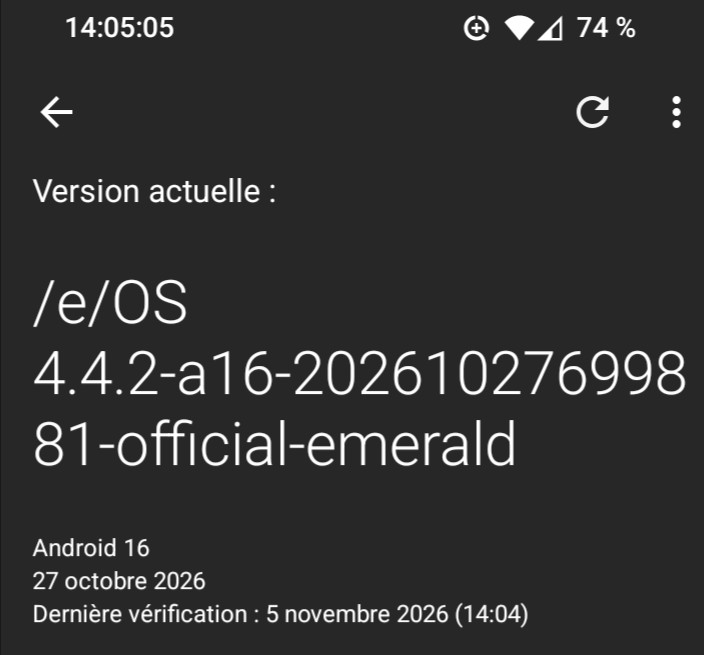
Das Problem bei mir hat sich mehr oder weniger gelöst siehe hier.

1 Like