FP6 shuts down with e/OS before end of installation

Hi there,

I have a FP6 (which I’m very happy with) with e/OS. It had Android, but I used the /e/OS installer to install e/OS easily. I wanted to do it again to get a ‘clean’ phone, but now the FP6 is shut down before I reach the last steps, and I’m not able to start it :frowning: It shows the Murena logo, and then the screen goes black… I’ve tried everything; removing the battery, pressing all buttons , changing cables etc., but nothing works. Help!!

What operating system do you use and what browser?

If on Linux, you will maybe be able to manually pick the process up from the part named ‘installing /e/OS’ on Install /e/OS on a Fairphone The Fairphone (Gen. 6/Gen. 6+) - “FP6” | /e/OS documentation

When you are on Windows, you will have to install Bash before you proceed. This is discribed in the documentation too.

1 Like

This suggests that the phone will not “normal boot”. To move forward as above you need to be able to boot to Bootloader.

Download

With the device powered off - hold Volume Down + Power

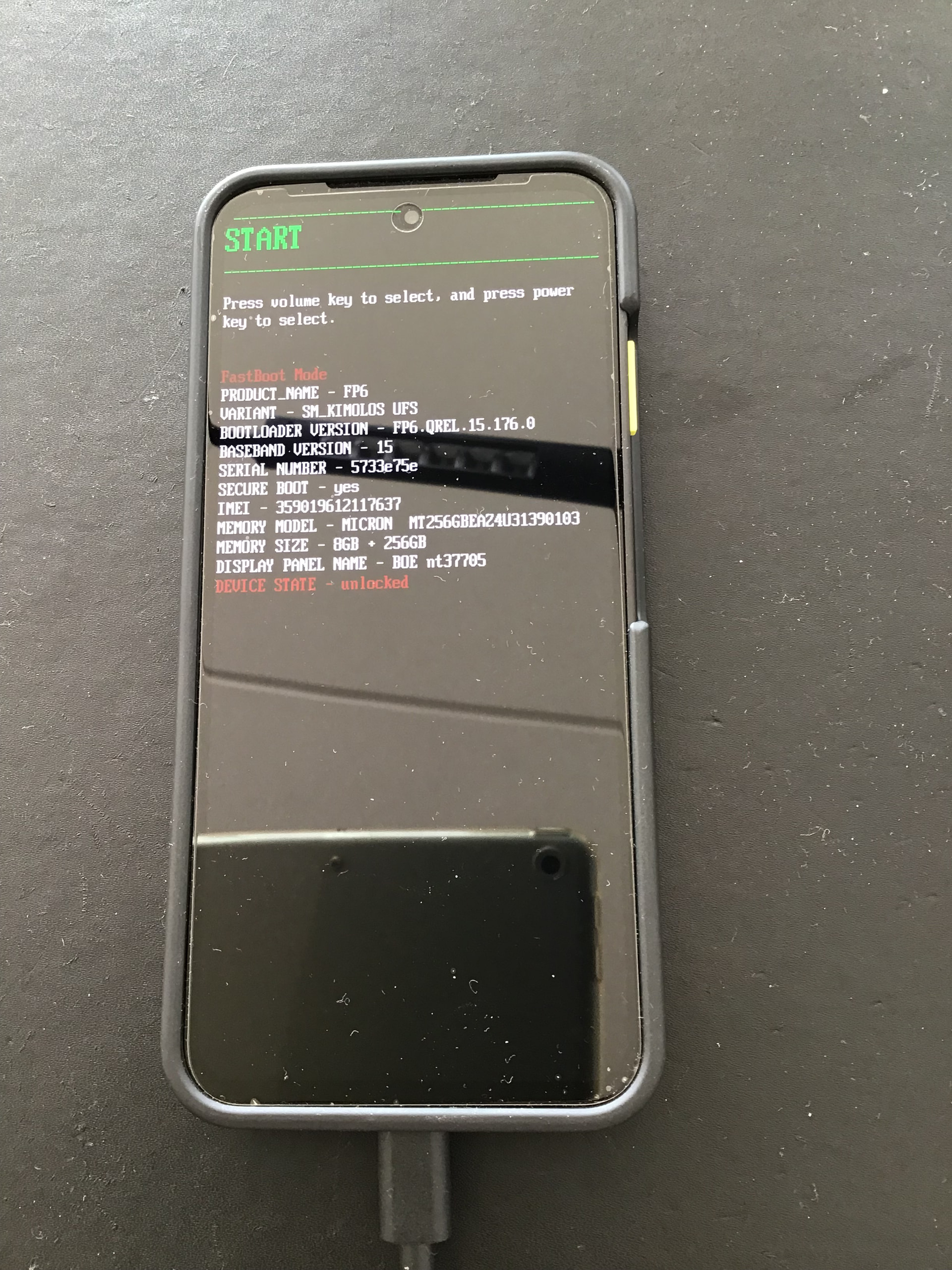
The correct screen has big green START at top and “Fastboot” highlighted in red.

eosinstaller probably cannot pick up from here.

I have tried - no luck. Thanks for exploring :grinning_face:

Edit. Being able to boot an Android phone into Bootloader is the primary “Proof of Life” test. No outside tools, just the correct button presses must lead to Bootloader.

Do you have an understanding of the anti-rollback hazard for Fairphones?

Source: Install /e/OS on a Fairphone The Fairphone (Gen. 6/Gen. 6+) - "FP6" | /e/OS documentation

Caution: Your phone has a security feature called anti-rollback protection. This prevents installing older software versions once a newer one is installed. If you try to install an older software version while your bootloader is locked, you may trigger an anti-rollback error and brick your device.

Symptoms of a bricked device are like EDL, whatever you do you only get a black screen. Did you lock the bootloader? Could you be in this situation?

If yes (I hope not) the fix is to have the phone reimaged by Fairphone at a cost ~60€.

I’ve used iOS on MacBook and Windows on PC. Same result.

Do I need some software? And then what do I do? (Sorry to ask, but I’m a beginner here :innocent:')

text in blue on this forum are links.

1 Like

What didn’t you use the factory reset function of Android and /e/OS ?

You were already running /e/OS, but the easy /e/ installer (web wizard) is not designed for something else than a new installation starting from Goog-android.

Try troubleshoot your situation by following the manual installation instructions like starting the recovery or what aibd suggested.

I’m afraid I don’t know of the anti-rollback function. I probably need a reimage with e/OS. Should Fairphone do this? or Murena? What address should I use?

I suppose in the first instance you would go back to the firm who sold it to you.

However if you contact Fairphone Support (link below) I would expect them to be prepared to go through a checklist with you to analyse the problem.

https://support.fairphone.com/hc/en-us/sections/31679642743186-Contacting-Support

I think “with /e/OS” would be a special case. If you bought it from Murena maybe they can organise that. As I understand, the standard service would be reimage with Fairphone’s own OS.

Just to check, this did not work? Jou have to hold the buttons for up to 5 seconds.

Download

With the device powered off - hold Volume Down + Power

The correct screen has big green START at top and “Fastboot” highlighted in red.

No, that did not work :neutral_face:

One last question to have everything clear: did you reinstall stock Android before reinstalling /e/OS using the /e/OS webinstaller?

No I, didn’t. Does that help?

please share photos of your phone’s screen.

1 Like

Well, in this case it means that all hope is not lost, but I don’t know what happened then.

I have tried all four screens; START, Restart bootloader, Recovery mode and Power off.

Then I get the Murena logo.

And then the screen goes black…

1 Like

don’t share IMEI and serial number

what is the output of :

fastboot --version

Great news @Ulla in case you are in any doubt,

That is the

The screen with big green START at top and “Fastboot” highlighted in red.

There is no need to try to “move on” from this “primary” Bootloader screen with the volume buttons.

You are safely in Bootloader mode.

You are also safely in Fastboot mode.

/e/OS can be intalled from your PC.

eosinstaller probably will show no reaction to the phone in Fastboot mode.

Edit. Notice (also in red)

Device state is unlocked.

You probably have to re-install E/Os not with the “web installer” but with the zip archive and the use of git_bash.