Dear @Paco90 ,
thx for your information. I didi the same with a Samsung A72q. I just donwloaded the 4.1-a15 and installed this via local update over 3.0.4 (T-Android).
Everything is working so far.
Thinking of updating a Google Pixel 7 pro from A15 to A16.
The answer to both both q3 and q4 is negative (unfortunately)
The answer to q2 is Android17. However, I cannot remember the answer to q1 (I installed /e/OS a year ago) - it was either Android15 or Android16.
Is there any way I can find the answer to this question by analysing the actual contents of the phone?
./payload-dumper-go -l e-4.2-a16-20260815662915-community-cheetah.zip
Please wait while extracting payload.bin from the archive.
payload.bin: /tmp/payload_542199047.bin
Payload Version: 2
Payload Manifest Length: 129007
Payload Manifest Signature Length: 267
Found partitions:
abl (1.9 MB), bl1 (12 kB), bl2 (537 kB), bl31 (98 kB), boot (67 MB), dtbo (17 MB), gsa (348 kB), init_boot (8.4 MB), ldfw (2.4 MB), modem (82 MB), pbl (41 kB), product (1.1 GB), pvmfw (1.0 MB), system (1.8 GB), system_dlkm (12 MB), system_ext (515 MB), tzsw (6.7 MB), vbmeta (8.2 kB), vbmeta_system (4.1 kB), vbmeta_vendor (4.1 kB), vendor (804 MB), vendor_boot (67 MB), vendor_dlkm (58 MB), vendor_kernel_boot (67 MB)
so you can have a go with upgrade …
Oh, thank you!
Somehow, I had missed the “Idfw” item in the list.
Does anybody know what is the risk if the upgrade is attempted without the appropriate firmware modules being available?
Is the upgrade process blocked, or the upgrade ends up wiping the data (and/or the phone OS)?
Hello!
I will need also some support in order to dirty upgrade my Samsung Galaxy S10 (SM-G973F) from android 13 to 16. I’ve read many threads (including this one) and made all backups I could, but I’m still not so sure about all verification to avoid bricking the phone.
The upgrade method seems easy with eRecovery (v.4.2 for me) and the zip file available online.
Actual eOS is “4.2-t-20260815662916-community-beyond1lte” (android 13), and original and latest stockOS was android 12. So i might have installed eOS with android 13 at first.
Q3 : Unzipping file “e-4.2-a16-20260815662915-community-beyond1lte.zip” shows a firmware folder, but no payload.bin file inside but many binary files:
cm.bin dqmdbg.img keystorage.bin modem.bin modem_debug.bin param.bin sboot.bin uh.bin up_param.bin
For Q4, yes Liniage offers upgrade to lineage-23.2 for Galaxy S10
I’m confused about to checking files, and would appreciate some help.
Thanks a lot
so you can have a go,
but better is to use e-4.3-a16-20260919677978-community-beyond1lte.zip
That’s a fast answer. Thanks
Merci !
Thanks to @piero for that great HowTo tutorial.
Today I followed the instructions to upgrade my motorola moto g84 5G (bangkk) from /e/OS 4.3-A15 to 4.3-A16.
I don’t know if it is an issue with the moto g84 only:
The recommended method to do the upgrade by the system updater failed with a message that the system updater is not possible to do upgrades from one Android version to another with a link to the corresponding LineageOS wiki: Upgrade LineageOS on bangkk | LineageOS Wiki
I followed the instructions of the wiki and successfully did the upgrade using adb.
One moment of confusion was the message on the phone that the new version will downgrade (!) the current one and if I’m sure to do that. I choosed Yes, everything went fine and it seems that all is working well.
Hi Piero,
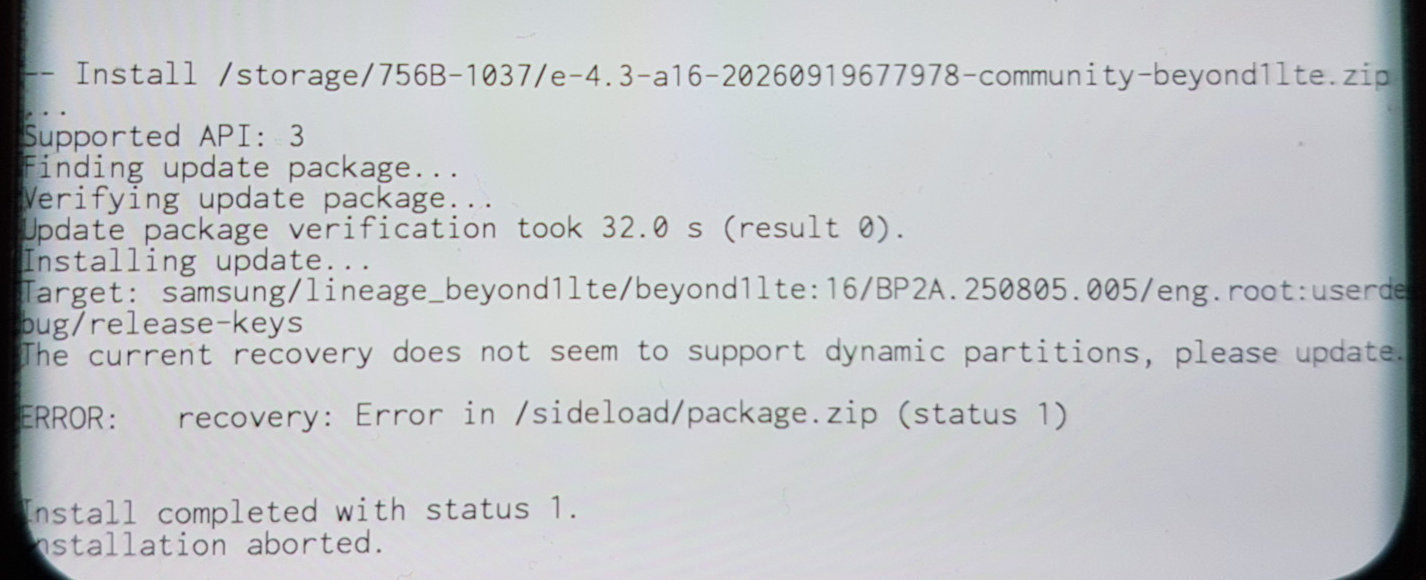
I try today to upgrade to a16 with the Recovery reboot process, and apply the upgrade via SDcard. Did also check the shasum before. Unfortunately upgrade to a16 fail with error:
The current recovery does not support dynamic partitions, please update.
Error: recovery: Error in /sideload/package.zip (status 1)
I’m glad I could reboot on eOS 4.2 (a13) 
The “local update” function will fail the same way IMHO. Is there an issue with the recovery partition ?
Looking for the error message seems to lead to the heimdall-way…
Any help is welcome
That is right. The a13 e-recovery is indicated by the error message to have non-matching partitions (dynamic) with the a16.
No need to necessarily Format data by this error, but you should upgrade the e-recovery before upgrade the ROM.
I guess the eRecovery partition can not be updated by booting to the eRecovery partition, and I will have to do it with heimdall. I’ve been looking for eRecovery captures and posts updating itself but I could not find it here.
I’m also wondering if I could boot the phone from the new updated eRecovery, and from there update the system to a16 via the SDcard method.
Thanks for advice
So you would flash the a16 e-Recovery just as per the install page.
Now when you boot into the a16 e-Recovery you could use adb sideload or SD card to flash the ROM itself.
Hello @Lionel.Scheepmans !
Depuis ton appareil android fonctionnant déjà avec /e/OS
[HOWTO] Upgrade my /e/OS to major Android version without loosing /data
Thanks Piero.
It was so easy to do it !
Unfortunately, the desk mode on external screan doesn’t seam to exist in /e/os android 16.
Have a nice day !