Search XDAforums.com
.
https://xdaforums.com/search/73661355/?q=Mi439&o=date
Thanks Piero!! appreciate taking time to reply!!
Right.. was there a lot (XDA).. but not found true “community” a lot of hit/miss and take it or leave it ROMs or “solutions” the history/essence of which is unknown, lectures to do this or that 
Looking for a more “stable” framework/community(?) and thought to start with e/OS (de-googled was main selling), i.e. important enough effort to give/spend time on..
Is there a way/procedure to “hook up” with folks who built /e-4.0-a15-20260612634536-community-Mi439.zip , don’t need much hand-holding nor bug them directly..
If “artifacts” (full device tree, etc.) are provided [aside from ROM itself] then it should be possible to “reverse-engineer” and apply to custom ROM trying to build.
Over-all we live by the lyrics from song Circle of Life.. never take more than you give so should be able to contribute back at one point
Naively thought it would just be repo sync/build (docker was [another] selling point), ok, so, past that “fantasy”'; and after ~30 edits to Android.bp and various adjustments:
$ repo diff > repo-diff-A15.lis
679 repo-diff-A15.lis
over 160 builds and it starts to look like running end-to-end single build might be near/possible
If it flashes or not, well. that’s another story Specifically on:
[ 208.179564] Failed to resize partition system_ext to size 613965824.
AI attempted to convince to remove system_ext from super, remove from fstab, etc. BUT, when confronted with the fact that e/os community build HAS it mounted:
Filesystem            Size Used Avail Use% Mounted on
/dev/block/dm-0       1.7G 1.6G   69M  96% /
tmpfs                 1.4G 4.2M  1.4G   1% /dev
tmpfs                 1.4G    0  1.4G   0% /mnt
/dev/block/dm-4       576M 492M   73M  88% /system_ext
/dev/block/dm-2       891M 806M   68M  93% /product
/dev/block/dm-1       763M 721M   27M  97% /vendor
/dev/block/dm-3        43M 1.4M   41M   4% /odm
tmpfs                 1.4G  12k  1.4G   1% /apex
It compared product size from failing ROM:
[ 208.179182] [liblp] Partition product will resize from 0 bytes to 2160861184 bytes
over 2GB! compared to file size of ~800MB.. then claimed something is PADDING extra space.. looking around BoardConfig.mk found this:
 90 ifneq ($(WITH_GMS),true)
 91 BOARD_PRODUCTIMAGE_PARTITION_RESERVED_SIZE := 1287651328 # 1228 MB
 92 endif
hmm.. would that cause it? No clue, just started a rebuild with these lines commented out. If I’m reading conditions right, it seems this is padding when GMS is NOT used (maybe condition should be ifeq instead of ifneq?)
Now curious why it is there even if it is not the solution…
Will update later. Happy weekend..
In case this interests anyone quick update:
Rebuilt with this fully commented out:
and flashes on first try using standard e/OS recovery:
$ time adb sideload  e-4.2-a15-20260801-UNOFFICIAL-Mi439.zip
Total xfer: 1.00x

real    2m54.921s
user    0m0.124s
sys     0m2.464s
wow!! Seems like a bug? it adds the padding of 1.2GB when GMS is not used!!!
Is there some channel/chatroom or better place in the forum to raise such things, this seems super easy to fix, and will enable a LOT more folks to feel like they are “worthy” when things work more smoothly..
That’s when “good news” stop (just kidding)… It then refused to boot, nothing on display just “e” with dot.. no loop, just stuck, adb/devices (nothing).. OK, so flashed community, boots OK.
Now flash custom, boom fails to flash! blocked due to (date may be off, typed from memory):
Current SPL: 2026-06-10 Target SPL: 2025-10-05 this is considered a downgrade
ok, so added
lineage_Mi439.mk:# enable spl downgrade when flashing
lineage_Mi439.mk-PRODUCT_PROPERTY_OVERRIDES += \
lineage_Mi439.mk:    persist.vendor.recovery_allow_spl_downgrade=true
to enable downgrade of security fixes, and it flashed, but still, not booting as before.
Tried in BoardConfig.mk
BOARD_KERNEL_CMDLINE += androidboot.secure=0 androidboot.adb.secure=0 androidboot.secureboot=0
as well as enable usb debugging by default:
device.mk-PRODUCT_SYSTEM_PROPERTIES += \
device.mk:    persist.sys.usb.config=adb,mtp
so far cannot get it to work, even when flashing using OFOX… the flashing part goes smooth, factory reset before/after…
Is there a guide how to boot e/OS custom roms first time? enable cli boot/dump all commands in text mode (linux style) or enable adb/devices by default?
Build front still keeps failing, on new things each time, incredible just how much is “hidden” there, and just how naive i was at first to try and do it w/o Android.bp changes We got over 20-30 cores , and over 80 “please file a bug” in logs
$ grep -iE 'please (submit|file) a bug' *.log  |wc -l
81
I bet these are mostly known already since that’s already fixed clang version in there and we can’t/shouldn’t update it..
Have a joyfull week! hope for better news soon…
Stormy.
Searching for more clues.. found this older guide:
Not sure how relevant 5 years later, it mentions ./builtbot.sh which appears to automate entire build? maybe it has all the right settings to avoid the 10’s of edits I’m forced to do to get past basic apex/cclang cores/issues ?
(it mentions it lives in some manifest, is that a good path to go to?)
Totally understand that experts have “no time” to explain to “newbies”.. still some basic clue would help, if that is how it is supposed to be/IS, fine, will keep doing as there IS visible progress; BUT, if e/OS has some special framework that (greatly?) simplifies, would love to hear!
BTW, when built Matrixx ROM, it was a LOT easier, never had to edit a single Android.bp, just worked out the repo/their steps.
Any tips welcomed!
Perhaps check out [UNOFFICIAL BUILDS] Samsung Galaxy S7 / S7 Egde for /e/OS S and /e/OS r - #43 by aibd
Not sure i follow … the link leads to your post from 2023 about docker scripts and android_build, which is replicated in the e/OS tree under build/make, so they would differ by the e/OS adjustments, i.e:
diff -r ./.git/config ../../build/make/.git/config
4,11c4,12
<       bare = false
<       logallrefupdates = true
< [remote "origin"]
<       url = https://github.com/LineageOS/android_build
<       fetch = +refs/heads/*:refs/remotes/origin/*
< [branch "lineage-22.2"]
<       remote = origin
<       merge = refs/heads/lineage-22.2
---
> [remote "e"]
>       url = https://gitlab.e.foundation/e/os/android_build
>       projectname = e/os/android_build
>       fetch = +refs/heads/*:refs/remotes/e/*
> [lfs]
>       repositoryformatversion = 0
> [branch "v4.1-a15"]
>       remote = e
>       merge = refs/heads/v4.1-a15
Tried a build with it failed due to duplicates so even soong agrees
[100% 1/1] bootstrap blueprint
FAILED: bootstrap blueprint
error: build/make/tools/compliance/Android.bp:20:1: module "compliance_checkmetadata" already defined
       tmp/android_build/tools/compliance/Android.bp:20:1 <-- previous definition here
not sure what that brings extra to already adjusted e/OS build setup/scripts?
I thought the docker path was deemed not stable/mature enough, or are you saying there are steps one can take from?
Specifically what’s “on the table” to make true progress and declare that first ROM “works”:
-
Can generate ROM relatively quick; however, not yet managed to boot any
only dancing “e”.. Is there a simple guide/steps to enable full login output, or disable many boot checks and/or enable ADB/debug by default so adb shell/logcat works out the box? sounds like basics for ROM building -
Planning to ultimately switch to OFOX, but to keep things as vanilla as possible, using e/OS recovery, for some reason the buttons turn BLOCK instead of BLUE (only the selected is BLUE), making it hard to know/see all options, otherwise functionally it seems OK, it’s not big deal, but might lead to discovery that will fix the other things as well:
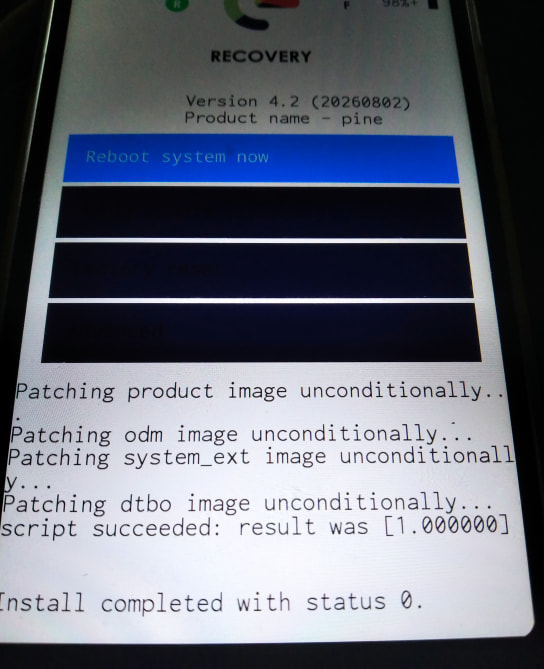
Once i get one of these working, hope to post the fixes which will be even better than a guide
Cheers!