Hi! I finally decided to degoogle my pixel 8 before eventually purchasing a fair phone 6 with murena. So I opted out from Android beta 16, wiped my device, updated my phone to latest as per instructions (I find out later that I should have install android 14 before attempting to flash) and started the easy installer procedure. Everything fine with unlocking bootloader, until, when trying to restart in recovery mode, my phone bootloop.
I’m pretty unaware of what I’m doing, i just follows instructions, so I have no idea where to start fixing the problem (if still possible, I’ve heard of antirollback stuff and pixel bricked, so I’m prepared to trash it).
I’ve tried pixel repair, pixel flasher on XDA, ADB and restoring stock firmwares, and zero. Phone can Power on, enter fastboot mode, power off, but any other option (recovery, rescue mode…) end in a bootloop with Google logo in white screen followed by a warning about my phone being unencrypted etc.
Sorry if I’m being wordy, but I thought that the more info, the better.
And thanks for your time!
Hope it can be solved somehow, warranty’s void…
as long as you’re still unlocked, the device ignores violating anti rollback (but yes, knowing the patchlevel dates is critical if you plan to relock right after and can’t wait until /e/OS catches up).
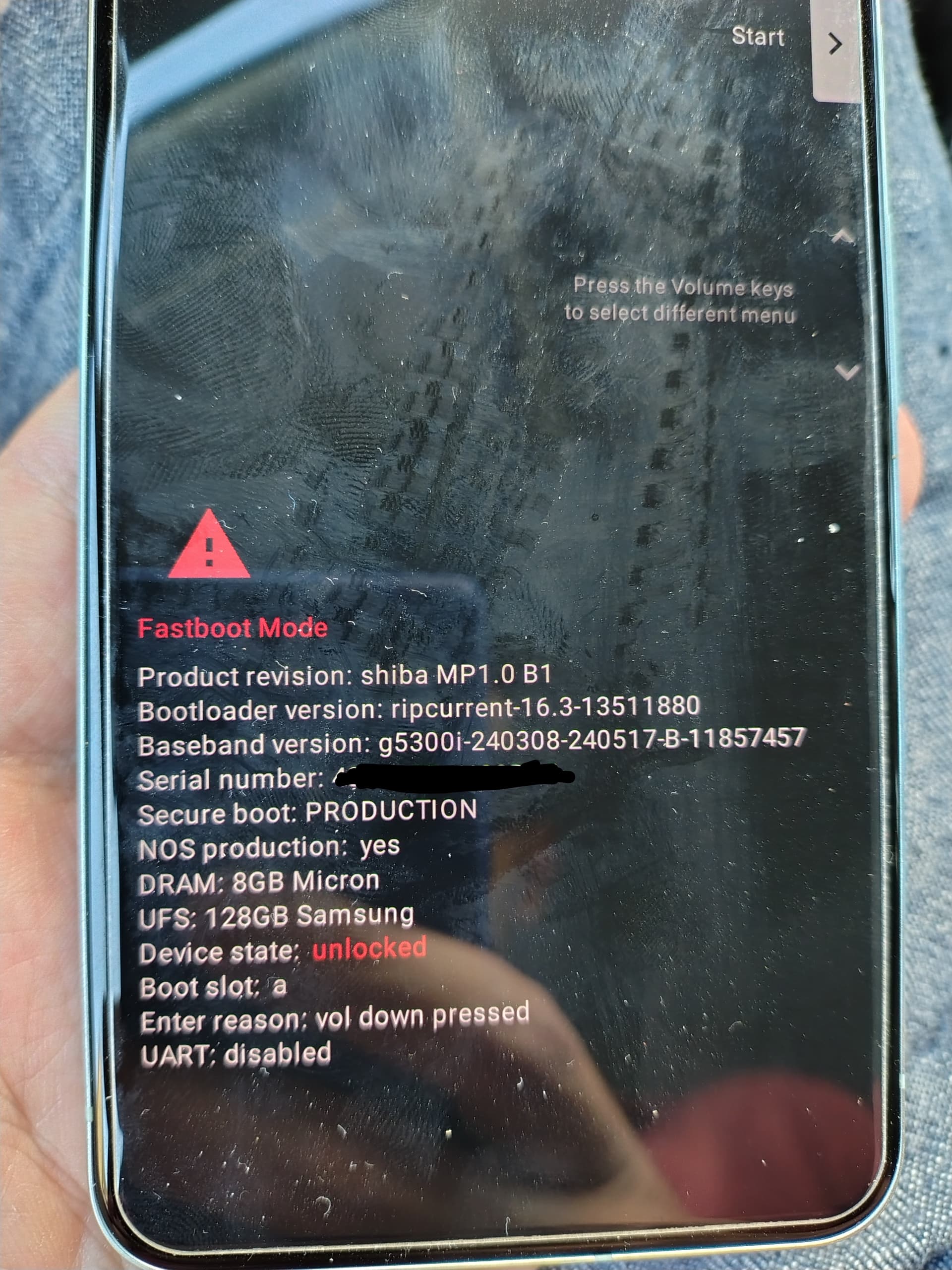
Restoring stock should’ve worked. I understand your phone won’t even stay in fastboot mode. Or if it does, can you show a screenshot (with serials blacked out) ?
you should be able to work your way out of this, just don’t relock (yet, until later making it past A15 in /e/OS). You could disable the verity/secureboot state if you’re curious if the bootfailure is up to this.
Get the fitting A14 stockrom firmware for shiba, flash partitions individually, remove custom avb key[*] to boot sucessfully to stockrom, then take a breath and redo instructions but use the cli method (and skip relock).
firmware version
judging from the screenshot this is verizon revision (B1), are you in the US market?
14.0.0 (AP2A.240905.003.B1, Sep 2024, Verizon)
search for the hash: 791d949dcfe5c7b817f74cbffc9df89ebe2292b19cb1487c3f7c941da6261010
[*] The /e/OS cli instructions provide a custom avb key, so secureboot is left enabled (thats is good). I’m unsure your failed install left the key there already. If so and you go to stock, it needs removal if you leave secureboot enabled for stock.
What was your last Android version before going through the process?
(I do wonder for others what’s their feedback on web- vs easy-installer for shiba)
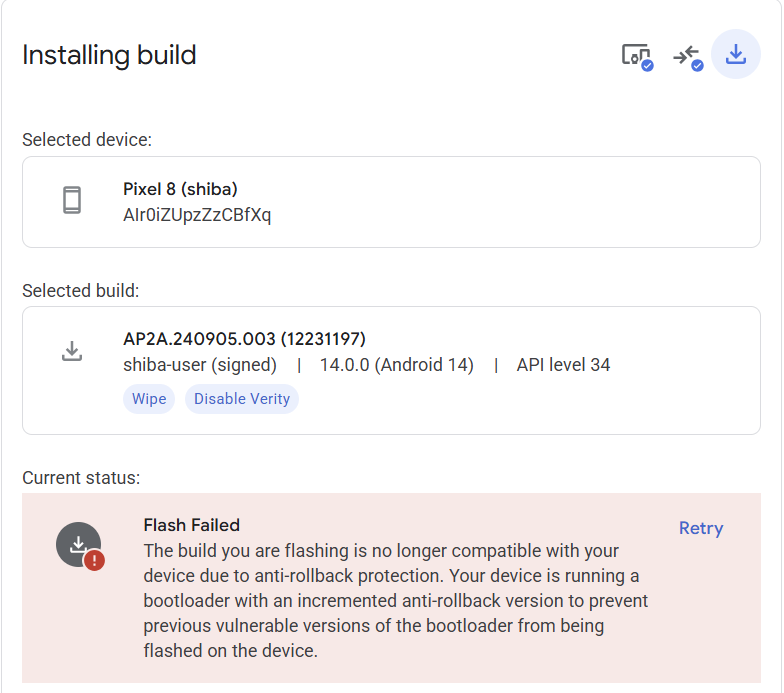
The phone’s is EU, but they replaced the mobo when i sent it for a repair, maybe they switched it for an US one? Anyway, i couldn’t flash android 14 stock from your link apparently due to antirollback wall, as in screenshot attached:
But i managed to install android 15, and the phone now works, i am so relieved! Thank you so much.
I can’t go trough e/os without android 14 tho, right?
I managed to disable verify during installation process, but i couldn’t find anywhere options about secureboot and avb key removal.
About your question, i think before attempting the installation to e/os i believe i was running stable android 16, which should be the default android version at the moment (i opted out from QPR1 beta and updated OTA, they should have delivered A16 stable).
if you keep the device unlocked and verity-disabled (secure boot) it could work. A15 /e/OS builds are around the corner. It will be a bit frankensteinian with a newer baseband than the match to Android major - but in other devices I used to do this and get away with it.
I’m not in a rush, I can wait whatever it takes for the 15 based os to come out.
One last thing!
You did mention a possible custom abv key which needs removal; keeping in mind that I’m not going to use the phone atm, waiting for the new build to launch, there is something to do in order to restore the phone’s setting and get, this time, a painless e/os installation?
I’m not sure where in the installer process you dropped out, this is for the sake of completeness, evidently it boots already - so can’t say if the Google webflasher didn’t already take care of that.
In the /e/OS cli guide, it’s at the relock stage where the keys /e/OS partitions are signed with gets put in place: fastboot flash avb_custom_key pkmd_pixel.bin
if you go back to stock and want to have this as factory as possible, remove that key again: fastboot erase avb_custom_key