I’m totally new in the world of reclaiming our devices, so please be lenient.
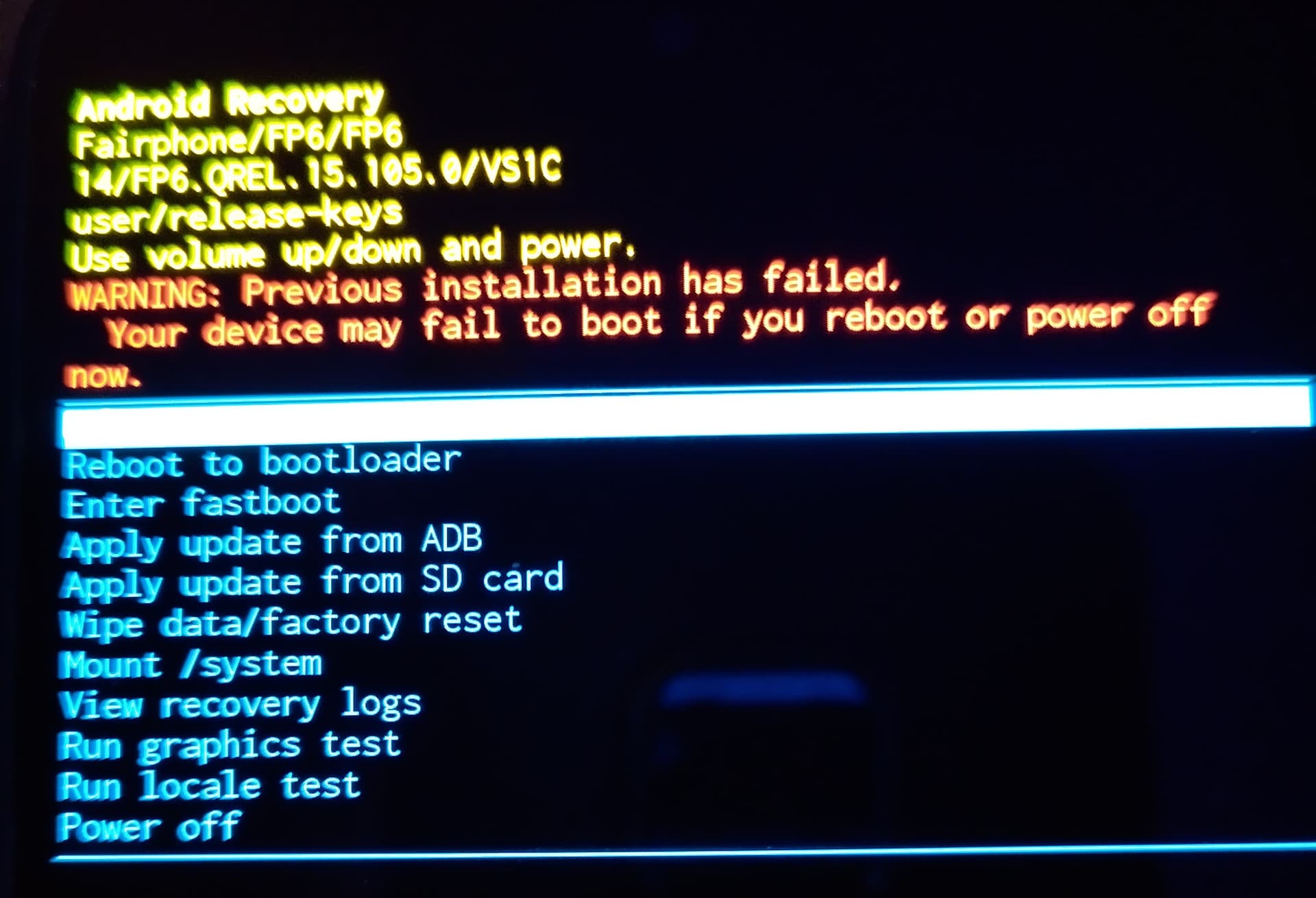
I tried the E/OES web installer. After the installation, I saw the Murena logo, and after this, I got stuck in a loop of these two screens:
I don’t have a lot of experience, but I wanted to give it a try and support the idea of Fairphone and eOS. But for now I would like to go back to the old Fairphone OS and maybe later to e/OS.
How do I achieve this?
You can check the articles on the documentation site. For Fairphone models there is a section called ‘Roll back to Stock OS’ . Follow the instructions given there. For example for the FP6, you can see the guide here.
For the FP6 installation, if you are still willing to try, there is a manual option to install which involves a script.
On the second screen you can see that it writes ‘Android Recovery’. What happend so far is thatjyou unlocked the bootloader and nothing else. I can’t tell why it won’t boot anymore into the OS. Anyhow, I recommend you to try the manual installation, the webinstaller is a blackbox for me. Tried to figure out how to make it work, in the end the time you spend you are faster with manual install.
Read the manual 2-3 times, take your time with each step, read ahead while doing one step. The prepartion of fastboot, adb and the driver is the most crucial.
Thanks for the help, for now I was able to get back to the factory OS.
My experiences so far (not relevant to the solution): I had the most problems with Windows 11, but I was able to switch to my old Windows 10 computer, and the web installation worked there, and I was able to get back to the factory OS. Under Windows 11, the FP6 wasn’t recognized as connected. Updating the drivers didn’t help either.
The web installer had to be restarted several times during the installation. I can totally agree with the statement that the installer is a black box.
For now, I’ll stick with the FP6 OS because I need a working smartphone, and when I install e/OS in a few weeks, I’ll go the manual route. As a beginner, I can recommend it to everyone. However, the web approach was a bit more helpful (pictures and step-by-step instructions without skipping).
As long as it would work, sure. It just doesn’t too many times.
Regarding drivers, on Windows you need like 2 or more drivers. First for adb then for fastboot and last for recovery. That is also often one hurdle users don’t take properly.
Almost same experience in my case. Brand new PF6, no experience with Android and never tried to replace the operating system on a smartphone. But /e/OS got my attention and I hoped it would not be too complicated when I discovered that I could use a guided web-installer tool.
I have been using weeks of preparing reading through forums and guides, and this morning I had collected enough courage to start the process, using Microsoft Edge browser on MacOS.
On first attempt the web-installer got stuck when the image download reached 65%, but a prompt asked me to refresh the webpage, which I did. The second attempt went through all steps without any errors in the web-installer, the phone rebooted many time and I had to repeat some steps enabling USB debugging. On the last step I saw a Murena text logo for a few seconds, but only that one time, after that the phone only very shortly shows the Fairphone/Android logo, and then it shows the fastboot menu (device state: unlocked). During the web-installer process, I can’t for sure say if the phone might displayed some errors, it quicky showed some messages with orange text, several times between reboot, but it rebooted so quickly, I didn’t get enough time to read the message.
I still have the desire to try and use /e/OS in the future, if the apps I like and use are working. But now it seems way more complicated for me to go on from here. First of all, I don’t even know how to get adb and fastboot tools to run on MacOS, the Murena guide leads to a Linux solution, so I’m unsure if it is even possible to continue without a Linux setup (I use a Mac Mini at the moment). So I feel very much kind of stranded and discouraged. I have very little experience with text commands in a terminal.
So I really hope that someone here, with some experience, would be so kind and guide me in the right direction.
As a sidenote I double-checked the security patch version, came from July 2025 on Fairphone OS and to Murena /e/OS dated 2025-08-01, so I guess that means August 2025, so roll-back protection should not be an issue in my case.
Mac is not very accommodating with cross platform work.
The SDK link within the /e/ documentation does have a Mac (darwin) download. Again perhaps not so easy on a Mac but it can be done. The unzipped executables need to go to Applications, will not work in Downloads I have read.
Hi and again thanks for your help! I’m new at the forum as well, should I delete my initial post in the first thread I created?
In the meantime I actually managed to get /e/os up and running! Working on it all evening and still sweating! Found the darwin tools with a web search and tried to figure out the guide on command line installation. Downloaded the Official build, checksum OK, checked with ./fastboot oem device-info and then jumped down in the guide to the Installing /e/OS section.
Actually it worked without moving the files away from the Download folder in MacOS. But I’m working on that too, switching to a Rasberry Pi in the near future.
The remaining thing is that I never got the chance to relock the bootloader. The guide says that this should be done before booting into /e/OS, but that happened automatically and the end of the script, before I could react. So can I relock it later, maybe waiting for the next security update, to be on the safe side? Or is it too late?
I switched to the command line guide and just flashed it again (jumping a few steps down in the guide, maybe taking a chance), and this time making sure to enter the bootloader again, before it boots into the OS. Then relocking the bootloader (2 commands, follow the guide).
Just be sure that you don’t trip the Anti-Rollback Protection and maybe check with:
fastboot flashing get_unlock_ability
If it returns 1 you can relock safely; if it returns 0 do NOT relock.