Same. Mobile Network usage is 90%.
Hi folks,
Just a reminder, the “random reboot” problem is also in this new version 3.5 - it does not really reboot, but if I unlock the screen sometimes I have to enter my pin rather than fingerprint.
See Random Reboot
FP5 official
Thanks again,
Regards,
My bank app stopped working (Ålandsbanken Sweden).
-
Vendor Name: /e/OS Fairphone
-
Device name: Fairphone 6
-
Device CodeName: FP6
-
Version of /e/OS or Stock which existed previously: 3.4 a15….Official/FP6
-
Is the device Rooted / Not rooted: Not rooted
Just sometimes at startup I have screen crashes
No others problems after the update…but the app “BoursoBank” still dosen’t work…and the official applications “France-Identité”, “banks…”, “CarteVitale”… Etc… must work, otherwise /e/OS cannot be a credible alternative…
Sharing with the team.
Any other user with FP5 having reboot issues.
1 Like
Thanks a lot @Manoj ,
much appreciated.
It is not that bad and I restart my phone normally once a week,
and only use fingerprint for unlocking, so it is not an every day
problem.
Kind regards,
I got an update from the development team:
This is a built-in security feature of android.
System will ask you to enter a pin every x number of hours as part of the specifications
Settings > About phone will have an Uptime statistic which resets on a reboot so that can be checked to confirm
4 Likes
Murena FP 3
MurenaOne
Both updated from v3.4 to v3.5 official.
Fast download, smooth update.
All went well, no problems so far.
Thank you team.
Thank you for clarifying that.
Kind regards
Just a reminder, the “random reboot” problem is also in this new version 3.5 - it does not really reboot, but if I unlock the screen sometimes I have to enter my pin rather than fingerprint
Are you sure that is a bug? I see the same behavior on my FP4, and I see it as a way to remember the password.
1 Like
-
Vendor Name - Murena FairPhone
-
Device name - FairPhone 6
-
Device CodeName - FP6
-
Version of /e/OS or Stock which existed previously - 3.4 Official
-
Is the device Rooted / Not rooted - no idea - it was official build from Murena store.
Download was fast, not a single drop during download, no slow speed, installation was perfect. Really liking the double tap to wake feature. But, noticing that the handset is rebooting itself more frequently than before. That’s been at least once per day but today has been twice so far. No idea what the cause is but thought I’d drop it in here as it was very infrequent before and wasn’t really much of an issue. Thanks
Thanks for adding tap to wake to the FP6! It works really well!
Hi,
Manoj clarified already, see here
Manoj
Two phones, redfin -Google Pixel 5 and herolte -Galaxy S7
Successfully updated:
-
Pixel 5 no issues, update went OK with 90 minutes of waiting, everything seems to be working like before, updated from official 3.4 to 3.5, still Android 13.
-
Galaxy S7 updated from the last beta to official. Everything seems to be working fine, update went smooth. Still Android 12.
S7 bootloader unlocked, and
Pixel 5, bootloader locked.
No root on both phones.
Still on S7 multiple users are still broken, hopefully in Android 15 the issue will get resolved.
Steam was broken after the update on Pixel 5, but clearing Cache and restarting the phone helped the app to work again as it should (couldn’t see notifications inside the app some kind of error).
Vendor Name: Google
Device name: Pixel 5
Device CodeName: Redfin
Previous Version of /e/OS: 3.4-t-20260114569181-official-redfin
Version of /e/OS: 3.5-t-20260211580869-official-redfin
Device: Not rooted
Bootloader: Locked
All my contacts are gone !!
Well not exactly : only two remain…
Not able to re-import them with Account Manager.
It sees my account xxxxx@murena.io :
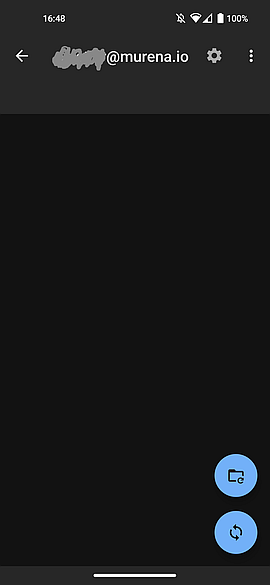
But I can’t go further, the two icons in the lower right do nothing when tapped.
I cleared the cache of Account Manager, then rebooted, but still can’t import contacts from my account.
The contacts on murena.io are stiil there, I did a backup in case the sync would be the wrong way (Phone → murena.io).
If someone has a trick to retreive the contacts, I would be glad to ear !
It’s so strange that people with the same hardware have such different experiences.
And, as usual :
The Advanced Privacy “frenzy” is still here, since 3.2.
I have to toggle off the ‘Tracker control’ flag to calm it down.
That’s really bizarre.
Specially for you, I’ve checked deleting my all contacts and before that, deleting my Murena accounts from Pixel 5 (redfin). Verifying that I don’t have contacts first and then removing Cache and Data from “Contacts” and “Phone” apps.
Then I added Murena account, then it synced all of my contacts, with the most recent ones that I added on my other phone yesterday. So, for me, it works perfectly.
1 Like
Anitaz, thank you very much !
I followed your steps, and removing the murena account, then adding it again restored all my contacts !
It’s great to be able to count on mutual support on this forum !
Thanks again !
By the way, on your Pixel 5, do you have the “Advanced privacy frenzy”, that is Advanced privacy that pops up a notification every 3-5 minutes, just to say “Hey, I’m there !”, kind of ?
1 Like
I don’t know what you are talking about, because maybe I disabled the popups long time ago, so it doesn’t appear in my phone. You can instruct me how to replicate this problem, excluding resetting my phone, because I have important things on it. Not for all system apps, but only for Advanced Privacy, but I don’t know.
I don’t know how to disable all the popups like you did; the advanced privacy app notifications can’t be disabled globally (toggle is greyed) on my device.
In Settings->Notifications->App settings->Show system->Advanced privacy, the individuals toggles are all on, and the specific “Tracker control flag”, if on, triggers a notification every 3-5 minutes with the message “Advanced Privacy is running”.
I guess to be the only one in this case, as nobody else complains…
Hi jalmer,
due to the fact that my Edge 30 was frozen when I tried to update it from 3.2 to 3.3 or 3.4 (A14), I have downgraded to 3.2 (only possible with complete data lost), since then it works fine (with 3.2 A14).
I am wondering how to update to 3.5 (A14 or A15) without frozen problems or data loss.
Do you have some information? How has you updated the Edge 30 to 3.4 without problems, and then to 3.5?