I wanted to provide an additional update regarding the issues I reported after updating my Fairphone 6 from /e/OS 4.2 to /e/OS 4.3.
I have now noticed a more specific and reproducible pattern concerning Google notifications, Gmail synchronization, and email sending.
After the phone has been running for several hours without being restarted, background synchronization seems to stop working properly.
In particular:
Google approval notifications for web login no longer arrive on the phone. For example, when I try to log in to my Google account from a web browser and Google asks me to approve the login on my phone, the notification does not appear.
Google SMS verification codes are also not received during this period.
The Mail app stops synchronizing correctly. New emails are not always received automatically.
Emails that are waiting to be sent can remain stuck and are not automatically sent afterwards.
Notifications from Google also seem to stop arriving during the same period.
The interesting part is that restarting the phone appears to temporarily resolve all of these problems.
After a restart:
Gmail synchronizes again.
Pending emails are sent.
New emails are received.
Google notifications for account verification start arriving again.
This makes me wonder whether there is a problem with a background service responsible for synchronization, push notifications, or network connectivity that eventually stops functioning after the phone has been running for several hours.
At the moment, I have to restart the phone whenever I notice that Gmail synchronization and Google notifications have stopped working. The fact that a simple restart immediately restores the functionality makes me think this could be related to a background process rather than the individual applications themselves.
I am not sure which component could be responsible, so I would be happy to provide logs or any other diagnostic information that could help identify the cause.
I will continue monitoring the behavior and will let you know if I notice any additional patterns, such as whether it happens after a specific amount of uptime or under specific network conditions.
Thank you again for your work and for looking into these issues.
The only issue I noticed was my DuckDuckGo browser took about 12 seconds to load even after updating it. The default browser and my Cromite browser seem fine.
Since the update to /e/OS 4.3-a16 on my Fairphone 4, all voice audio is played back sped up and high-pitched: voicemail, Signal calls, WhatsApp calls, even with a headset. Media playback (VLC) and Android Auto are fine. I understand the cause has been identified, but that no 4.3.1 release is planned and the fix is expected in 4.4.
I have to be honest: this is not a cosmetic bug. It is a regression in a basic phone function. I can no longer understand voicemails. For people who depend on their phone for work, family or health-related calls, that is a serious handicap.
Shipping an update that breaks core telephony on a supported device, then asking users to wait for the next major release with no timeline, is hard to accept. Users chose /e/OS partly because they trust it to be a dependable daily driver.
I would like to ask:
Can the team reconsider a targeted 4.3.1 build for FP4 with just this fix?
If not, can you give a realistic date for 4.4 on the FP4 stable channel?
Could regression testing of the voice/communication audio path be added for future releases?
I’m happy to provide logs or test a build. I’d much prefer to stay on /e/OS, but if there is no fix or workaround in the near future, I am seriously considering flashing another ROM, because I can’t keep a phone whose call audio is unusable.
Thank you for your work, but please treat this as the priority it is for those affected.
Vendor Name - Fairphone
Device name - Fairphone 6
Device CodeName - FP6
Version of /e/OS or Stock which existed previously - /e/OS 4.2 A16 official
Is the device Rooted / Not rooted - not rooted
Compared to version A16 4.2 official build following changed in version 4.3:
[FIXED] App Lounge installs apps very slooooowly
[FIXED] NFC-Payment via Curve not possible
[FIXED] Apps take a lot of time to open when started, i.e. Prime Video

[UNFIXED] Android setting Privacy Dashboard crashes when opening app list for some priviliges, i.e. call list
[UNFIXED] Buying movies in Prime Video not possible any more, even if App Tracker is disabled
[UNFIXED] Many apps don’t start at all ot freeze when login is performed, i.e. Miles car sharing app
[UNFIXED] Hardware switch not working properly when phone is locked (some functionality like microphone/camera disable)
Version of /e/OS that existed before: e/OS 4.2-a16-20260815662938-official-FP6
Device is not rooted (FP6 bought with Murena pre-installed)
What works
Overall, things are working.
Latency issues seem to have been resolved, thanks!
Strange behaviours
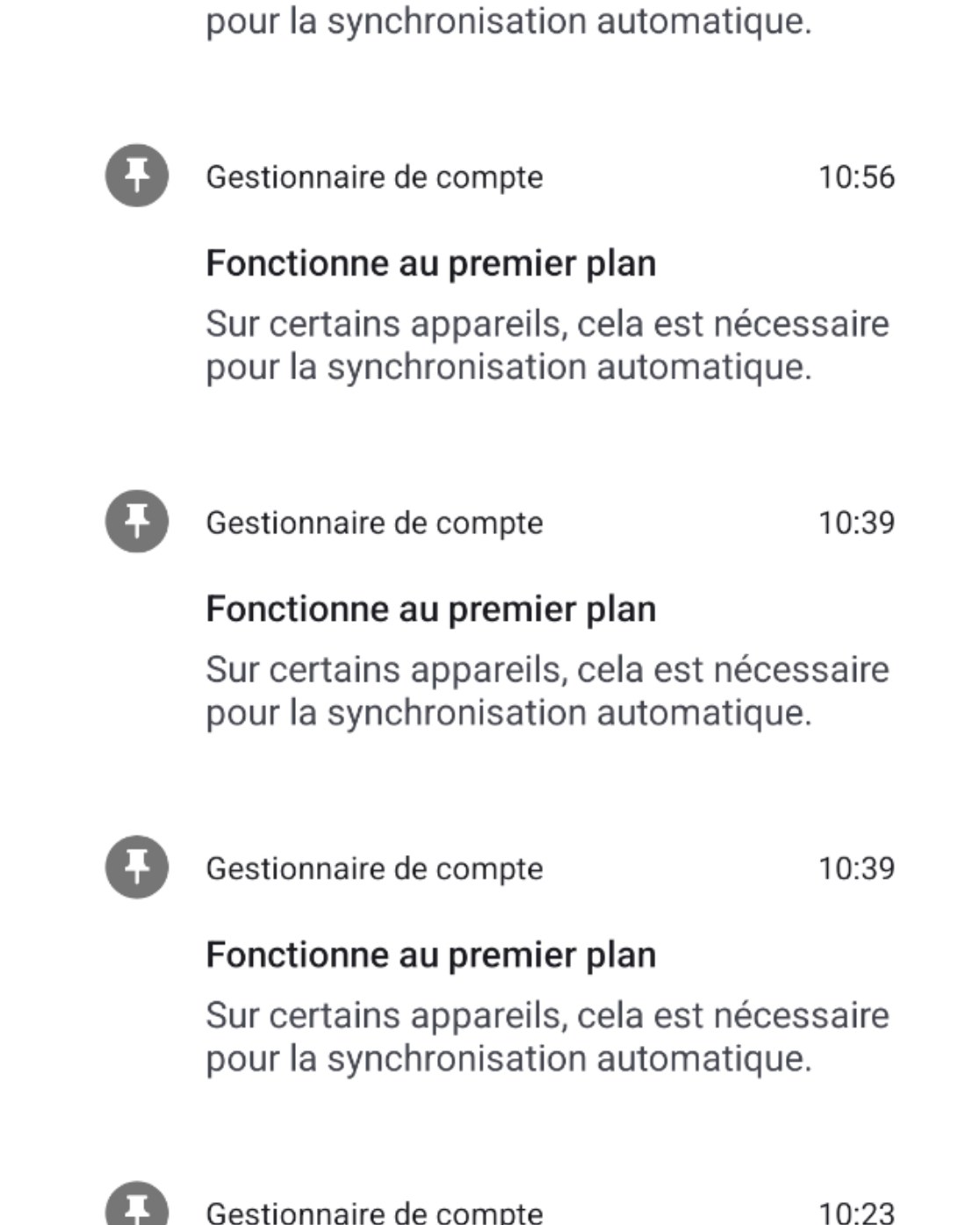
Silent notifications from the account manager appear briefly several times a day (see screenshot). English translation of the notification: Running in the foreground. On some devices, this is necessary for automatic synchronization.
FP6 on eOS 4.3, MMS send/receive not working on FP6 with eOS 4.3 on Telstra network in Australia, have raised issue #9711. MMS immediately stopped working after upgrade to eOS 4.3. Previously worked with no issues on eOS 4.2.
When I updated to 4.2 I stopped receiving texts but making my phone prefer 4G fixed it. May or may not help but an option to try. The setting is in settings > network & internet > SIMs > tap on the SIM that you receive texts with > preferred network type > change from 5G to 4G. I always got bad reception on 5G but 4G is way better. Idk what about the update broke it tho but we realized I was getting texts when my phone got phone calls because the “use 4G for better call quality” option was enabled. Idk if this will solve your problem but worth a try. EDIT: you do have to wait 30 seconds after changing it before the texts come in if this is the solution
Mickey Mouse is back.
After updating my FP4 with 4.3 16-20260917677552-official-FP4, Voice Calls in Signal are back to Mickey Mouse pitch. I had this mistake (noticed on MS Teams Calls) some time ago but it was fixed. With the recent release, the audio is louder in phone calls, which is great, but Signal calls are not possible anymore as the person on the other end sounds like Mickey Mouse. It would be great if the volume in calls could remain high but the pitched voices could be fixed. Thanks for your great work!
I would give this as general recommendation, at least in Germany. This will save power and won’t affect data speed noticably.
Reason: outside the large centers, 5G is deployed mostly by “spectrum sharing”. A software update of the newer base stations enables them to send on a part of the existing bandwidth with 5G protocol (“coexistance”). The uses sees "5G on the display and thinks “wow, high speed” but as no extra spectrum / bandwidth has been added, it’s useless. But the phone’s processor has to handle an additional protocol…
The v4.3 builds for FP6 which were on hold are being released again. QA has not been able to replicate reboots on the FP6. It was noted in one particular device only and not others. Also checking for hardware issues on the device.
v4.3.1 would be exclusively for FP4 to resolve the issue with the audio distortion while making calls using certain apps. Team testing the build. Will share release update.