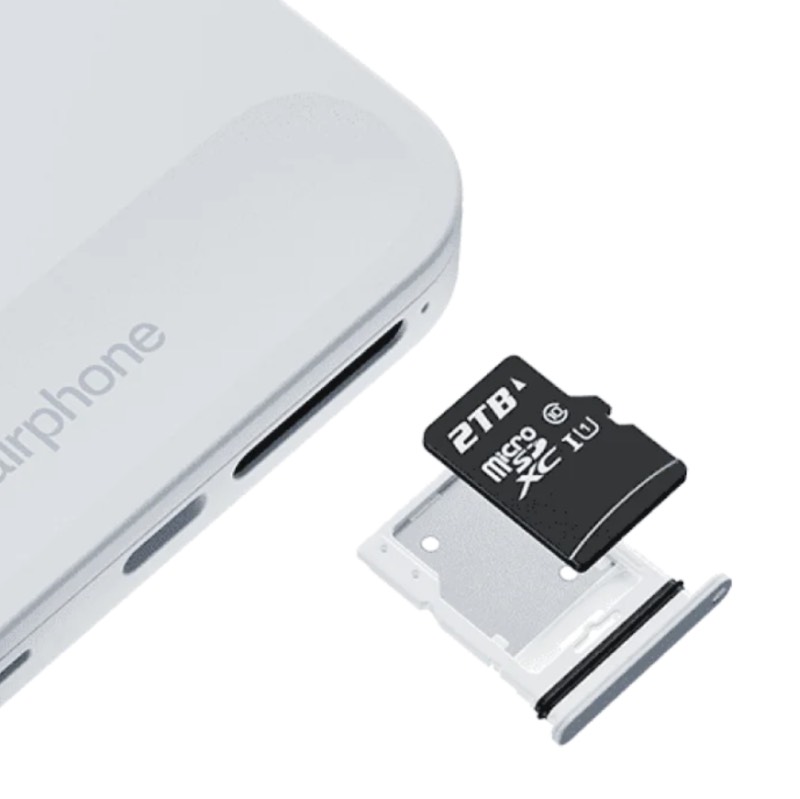
Just unboxed my new FP6, put the SIM in and wondered, where the SD-Card from my FP3 could be inserted.
Went through the Faiphone-pages, found this one with all the right questions, and no available answers - Javascript seems to be futile sometimes.^^
Even “chatted” with the AI, to no avail: Got the same webpage suggested thrice that I was already on and had complained it didn’t work.
So, just did it without the SD-Card for the first, and there was no prompt to read another phone, when it was done. Maybe I missed it somehow or the cable wasn’t set correctly, though it should as I had a sound reaction by connecting via USB C. Apparently my fault. But how do I repair this?
I don’t want to mess around without my contacts and messengers and all the stuff, and I am too curious what might be left of my settings once the data is ported.
Does somebody know whether the “Getting started”-routine is restarted other than a factory reset?
to re run the setup wizard, you can factory-reset from normal mode
→ android settings → reinitialisation options,
and also from recovery, and from fastboot -w
For the SD card I was quite sure that it is not located under the battery as with the FP3. I took the battery out, and there was no slot to be found. The only idea for the microSD slot that I got is that it might be the same as the SIM slot, but this was only said in the clip and not shown. Does that probably mean, there is either a physical SIM or a microSD?, I thought.
Then I took a closer look and found this picture. And exactly, on the upper side the SIM is located and on the backside of the same carrier you can insert your microSD. A little tricky to handle as you should’nt touch the contact areas, but now I have all the music on it again, some 4.000 songs.
I forgot to mention that it is a Morena-e/OS and it seems that the setup-process is different compared to a stock Fairphone.
I did a factory reset via recovery and restarted the phone. Got prompted for anything like language, time zone, personal PIN, childrens’ protection (jumped), Find my device and so on, but never had the option to connect to another phone.
Now I’m as wise as before, though I have my music back.
I get to choose between using the FP6 without any contacts or reactivate the FP3 until I get to know how I do it. Kind of a bumpy start.
It is not just the contacts. I have messengers on the FP3 and bookmarks and settings and backgrounds and other apps like F-Droid and ConnectBot and BatteryBot and…
Just wonder, how far the synchronisation goes (if only it started) and what is sorted out by hand later, e.g. my settings regarding filenames for photographs and stuff like that.
Well, it looks like there is a shift of responsibilities: Murenas website sends me to the support of fairphone.com because I purchased the thing there - with the Murena made e/OS.
My prognosis is that Fairphone will send me back to Murena for they are the manufacturer of the questioned software. And then vice versa until what?
Old FP3 (Android 13), new FP6 (Android 15), both with e/OS.
No prompting for any copying process, no contacts, no apps, no settings transferred so far. No information how to start this process, Murena sends me to Fairphone (as I bought it there with e/OS on it), Fairphone has no helpful answers and only suggestions that do not work for me.
So I have a new phone and am still using the old one since there are all the things I want to use. The new one is bare so far.
BTW, the “manual” does in fact say that there is the same slot für SIM and microSD. The AI on the Fairphone website insisted that it is located under the battery…
Hmm, well the whole transfer from one device to other is more a backed into Google thing. Murena not providing useful documentation or ‘Getting started’ also not great.
I usually switch with SeedVault (settings → system → backup) if I wanna keep my app data. But this method also can’t transfer app data from every app. Therefore I end up setting up apps again and I feel like it wasn’t worth it and should have done all manually, since you could also think about which app you really need and if you wanna keep it.
Regarding files, SeedVault can’t do that. Then you can either use good old, manually transfer to PC and back or use some ‘app’ which does it for you, just automated.
Documentation from Murena (/e/OS):
You can check yourself what else they offer, top 2 just examples.
Aww, the good old reliable AI . Perfect example why I never use it and no one should at the moment in my opinion.
For me this is kind of a menace as I only switch when it’s absolutely neccessary (here the end of the core support of FP3). Some people seem to enjoy fiddling around with their devices - I’m old and don’t need this s***.
Yes, everytime I do I learn something - but I’m not sure whether I wanted to know sometimes. Only want it to work in a transparent and reliable way.
If it would work like “Getting started” suggests you’d have to make some adjustments, find this or that flaw, but the biggest part were done automatically.
After this might be misleading I started backing up the device. We are talking about some 90 GB just from the disk, and I have strangely slow data rates of around 5 MB/s. I transfer the data while charging, and here’s something good about the battery drain of v3.3: It is on the hook for a long time every day. Anyway it will last a bit.
On the HowTo site an app named Package Manager (link to F-Droid from me) is suggested for backing up applications and application data. It seems though that there is a newer version displayed in the HowTo than gets installed to Android 13.
Especially weired is the fact that you wouldn’t get [Abort] and [Ok] after exporting and then maybe a sandclock, but the options are [Abort] and [Share] (which doesn’t lead anyhere senseful), and it just exports and then the action window is simply gone.
Well, I tried. It failed gloriously insistig that the microSD slot for the FP6 is under the battery…
How comes I cannot backup my telephone data to my own PC but throw it into some cloud and have them easily restored? Makes no difference to me whether GRGL or Murena, they’re just other people’s computers.
On Windows might this be a drivers problem? Usually revealed by a Device manager window showing a “Problem device”. If this proves necessary be sure to get drivers for the phone in Fastboot too as likely the initial driver may be inadequate.
On Linux does your distro include special advice to connect with Android? (Perhaps keywords udev rules and plugdev.)


 . Perfect example why I never use it and no one should at the moment in my opinion.
 “Problem device”. If this proves necessary be sure to get drivers for the phone in Fastboot too as likely the initial driver may be inadequate.