Regularly I am seeing strange devices connected to my Murena Workspace account - that is, when I go to files/settings and then click to set an App Password, there has consistently been a Linux or eOS v2 android devices connected to my account (my eOS device is now v4 - and not connected to murena cloud - unless I log in via my web browser). I don’t own either! I wipe or revoke and they come back. Since I have nothing stored in the cIoud, presently, I’m not overly concerned. Also, don’t think these devices are getting in via the front door: I use very long, randomly generated passwords and a 2fa app for generating access codes. Anyone else seeing this? If I wipe the device, then change password, how are they getting in? Or are they really “in”? I don’t like what I’m seeing. Anyone else experiencing this?
I just checked and do have the same issue. There are two unknown sessions:
/e/OS v2 (Android) Nextcloud-android
/e/OS v2 (Android) Owncloud-android
These are internal apps like eDrive and Account manager which access the workspace. Have asked the teams to modify the text so that this is clear.
Ok, that’s good news. And what about the Linux (Google Chrome) device that appears?
Ok, @Manoj can the same be said for the Google Chrome Linux session?
Pl can you share a screenshot
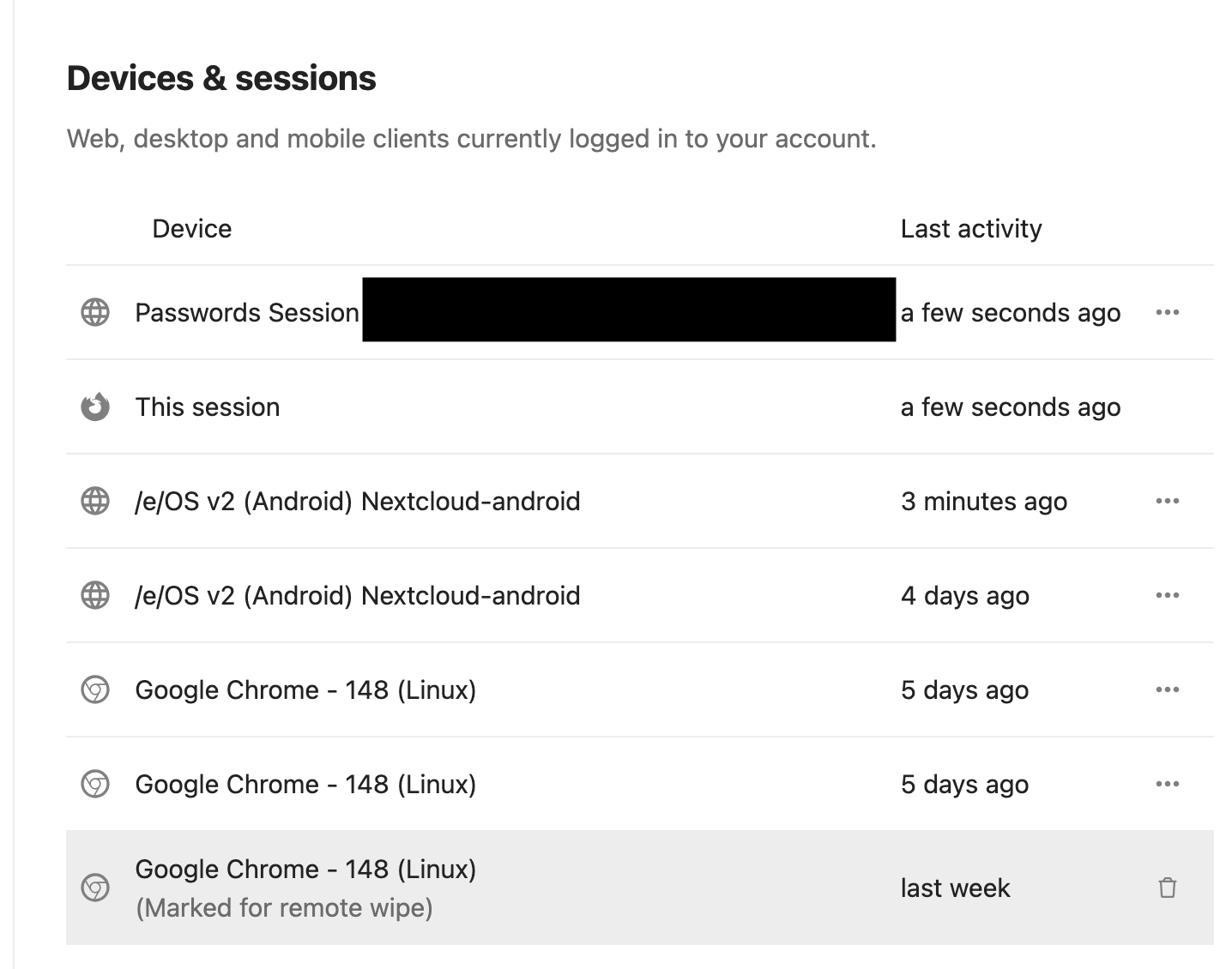
Thanks. Let me pass it to the developer to check and get back what is showing up.
Are you using Chrome on a Linux PC and used it to login to murena.io from there.
No, I’ve never used a Linux PC, nor do I use any Chromium-based browser to log into this account.
Have you ever used murena.io in a third party browser.
Browsers I use (all browsers are up-to-date):
-
Desktop (iMac): Waterfox (fork of Firefox), Safari, or Vivaldi (Chromium) - but I’ve only ever used Waterfox/Firefox with Murena site
-
Phone (Fairphone 4 with eOS v4): Fennec (fork of Firefox), or Murena Workspace “app” (or shortcut?…that comes pre-installed with phone)
I just remembered: Previously (months ago) I used Nextcloud to connect/sync files on my phone/desktop with Murea Workspace. No longer after seeing these sessions appearing.
Have passed on the details to the team.
The developers are looking into it. We display the information of the user agent as shared by the browser the user is using.
@manoj I’m just checking in to get status update on this issue – have you heard back from developers?
The developers were discussing how to handle this. The write is not forced on the part of /e/OS. It just writes the information as it receives it from the user browser. Forcefully writing a different text is not a good way of doing this. The team is working out a solution and would put in a fix in one of the upcoming releases.
Ok thanks for update @manoj. But I think I’m a step behind: You said the eOS was for “internal apps”. I’ve been concerned that the Chrome sessions were intruders…. Do I understand you to say that they are also internal apps or admin tools of some sort? And that the developers are working out a way to “modify the text” here also so that it is clearer as to who this is?
The logs are using the text shared by the user browser as is. Any browser on the phone which is used to accesses murena.io writes to these logs. What the developers are checking is if they can make the text simpler for users to understand instead of assuming that the device is being hacked. For example, some browsers may be wrongly identifying a mac machine as a Linux system.
This topic was automatically closed after 90 days. New replies are no longer allowed.