Android Auto invisible / FP6 e/os

Bonjour à tous,

Par avance, mes excuses pour ce sujet fréquent. J’ai lu beaucoup de topics jusqu’ici mais je n’ai pas trouvé de cas ressemblant au mien.

Je possède un Fairphone 6 sous e/os depuis mercredi. J’en suis ravi, tout fonctionne parfaitement… sauf Android Auto, mais je m’y attendais un peu.

J’ai tenté d’installer les stubs AA pour ne pas réinstaller les applis G., car je trouve que cela n’aurait aucun sens. Cependant, je suis débutant dans ce domaine, j’ai donc peut-être fait une erreur !

Pour l’instant, c’est un échec. J’ai bien trouvé et activé le mode développeur sur AA pour “accepter les sources inconnues” mais la voiture n’arrive pas du tout à se connecter à l’application : j’ai un message d’erreur immédiatement, dès la tentative de connexion (mon téléphone est bien reconnu en bluetooth cependant).

Autre source d’interrogation : l’icône d’AA est invisible dans la liste du téléphone. Je vois l’appli dans la liste des Paramètres, mais pas dans le menu principal du téléphone. Par conséquent, impossible d’ouvrir AA sur le téléphone seulement : est-ce normal ?

Un très grand merci pour votre aide !

EDIT : j’ai téléchargé la version 4.0 de e/os, sans problème ni bug apparent. Cela n’a semble-t-il rien changé au problème (l’appli n’apparaissait déjà pas avant).


(Translation made with IA Euria)

Hello everyone,

First of all, apologies for bringing up this frequent topic. I have read many threads so far but haven’t found a case similar to mine.

I have owned a Fairphone 6 running /e/OS since Wednesday. I am delighted with it; everything works perfectly… except Android Auto, which I somewhat expected.

I tried installing the Android Auto stubs to avoid reinstalling Google apps, as I felt that would make no sense. However, I am a beginner in this field, so I may have made a mistake!

So far, it has been a failure. I did find and enable developer mode in Android Auto to “accept unknown sources,” but the car cannot connect to the application at all: I get an error message immediately upon connection attempt (although my phone is correctly recognized via Bluetooth).

Another point of confusion: the Android Auto icon is invisible in the phone’s app list. I can see the app in the Settings list, but not in the phone’s main menu. Consequently, it is impossible to open Android Auto directly on the phone: is this normal?

Thank you very much for your help!

Regain your privacy! Adopt /e/OS the deGoogled mobile OS and online services

Same problem. I’ve been trying to get the A.Auto to work and failed so far. It was strange to me too not being able to find AA in the apps but most likely it’s now integrated into Android rather than a separate app, my guess. It appears A.Auto won’t work without Google app, G maps, G text to speach. I tried installing those in the walled garden but probably because AA is integrated I can’t move it or install it in the gargen space (using Island).

What’s worse is that the moment the phone detects that it connects to a car, the AA hijacks the audio controls and I can’t even use it for music or phone when paired with BT, although it shows it’s connected.

So very strange, didn’t Murena test or look at the car connection, it seems a significant piece. To me that is ten times more important and useful than the Murena native apps, unless they plan to make it work with their native maps app.

Hoping someone has made a greater progress and managed to get the AA working without opening the phone to the G tentacles.

I have the same problem. I have the FP6 for a few days. I can’t find the android auto app after downloading it and reboting the phone. I can only find an android auto stub.

My previous phone could connect wirelessly.

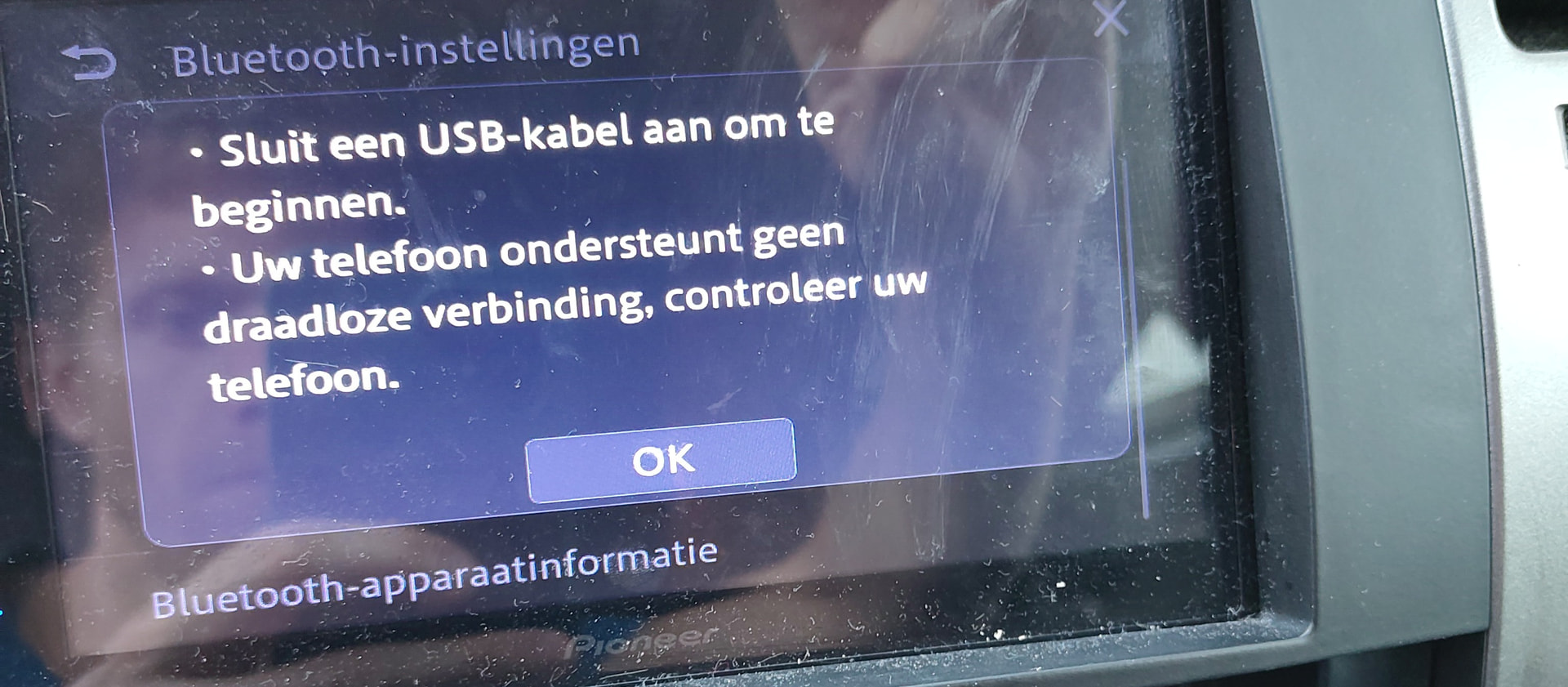
When connected via WiFi and Bluetooth with my pioneer SPH-DA360DAB I get this error:

It states that I should use a USB cable and that my phone does not support a wireless connection (check the configuration).

Does somebody have a solution?

Even though I just installed android auto today for the first time, I noticed that I was still able to update it. After updating it my problem was solved.

Apparently the first install is not the latest version.

Merci beaucoup pour vos réponses.

Mes recherches ont jusqu’à présent été infructueuses. J’ai déjà mis à jour AA depuis le store, activé le déboggage USB comme cela est mentionné parfois, tenté d’installé les app imitant Google (par exemple à partir de ce thread : [FEATURE PROPOSAL] Add fake dependency for Android Auto in native build /e/OS )

Je suis dans la situation de @zehjott sur ce thread : Cannot manage to install Android Auto - #9 by SalmonSnake : j’ai simplement un message d’erreur sur ma voiture lorsque je cherche à la connecter au téléphone (alors même que le Bluetooth fonctionne très bien : je peux appeler et recevoir des appels). Ma voiture est une Skoda Scala de 2019.

Y a-t-il une autre solution que je n’aurais pas essayée, autre que celle d’installer les applis Google officielle ?

__

Thank you very much for your answers.

My research has so far been unsuccessful. I have already updated AA from the store, enabled USB debugging as sometimes mentioned, and tried installing apps that mimic Google (for example, from this thread: [FEATURE PROPOSAL] Add fake dependency for Android Auto in native build /e/OS ).

I am in the same situation as [zehjott] on this thread: Cannot manage to install Android Auto - #9 by SalmonSnake

I simply get an error message on my car when trying to connect it to the phone (even though Bluetooth works perfectly: I can make and receive calls). My car is a 2019 Skoda Scala.

Is there another solution I haven’t tried, other than installing the official Google apps?

Bonjour,

Je suis très satisfait de mon FP6 /e /os. Mais, à quand une mise à jour pour que Android Auto fonctionne avec.

Hello,

Only beacause I saw your topic, I wanted to say that I solved the usage of Android Auto by buying a refurbished android smartphone that I use only for AndroidAuto with Sigyc GPS. I have no SIM-Card in this Smartphone, run it and connect it to the car only when I want to use the GPS in my car. I will never try to install AndroidAuto on my /e/OS Smartphone.

It worked for me after completing the steps again. Pixel 7 4.1.1