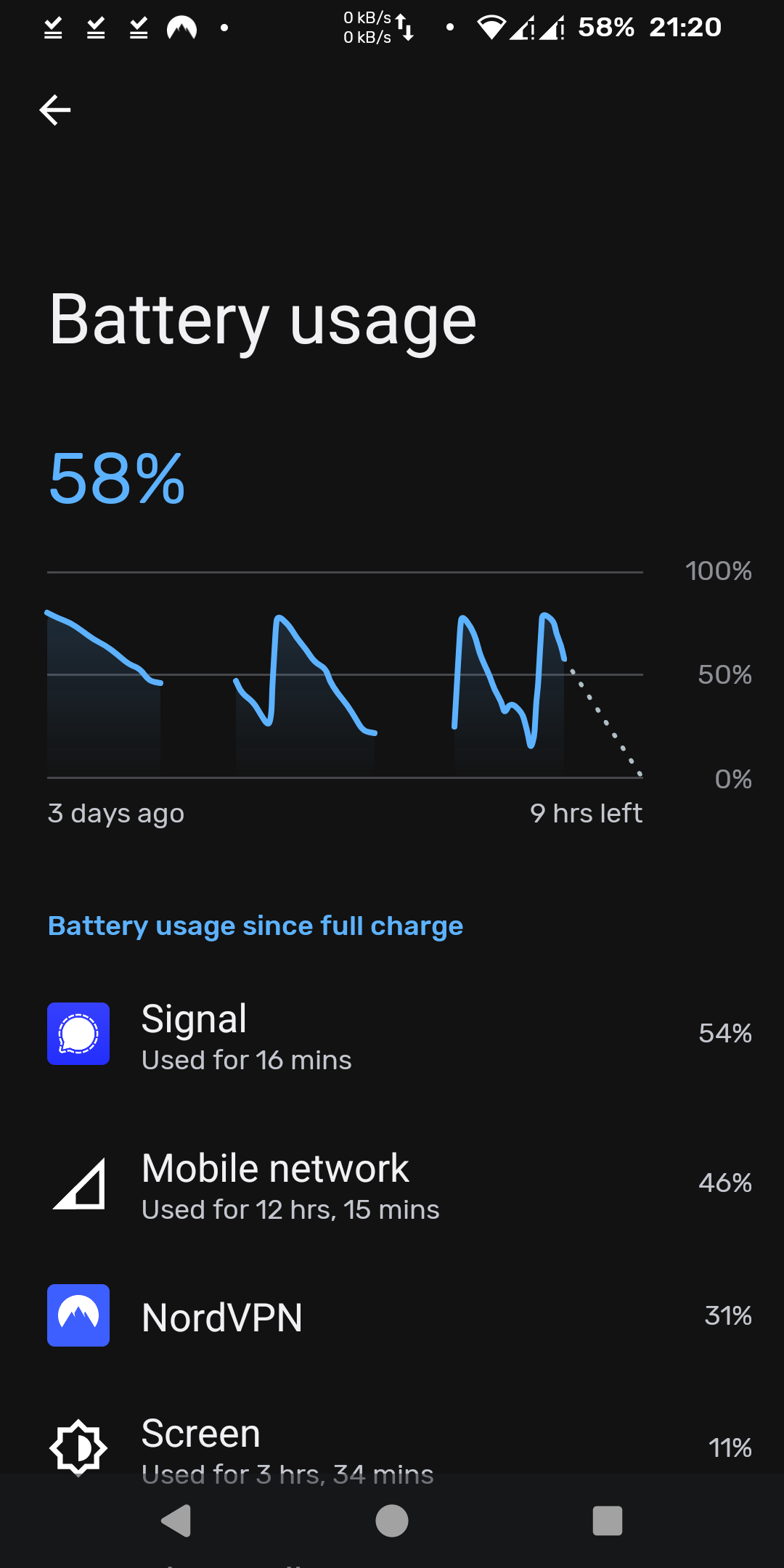
I everyone, I have a FP3 with Android 13 (/e/OS v3.0.1) and I am experiencing huge battery drains during the day. My FP3 battery used to last the whole day but recently I sometimes have to charge my phone twice a day.
It seems that when I am exclusively connected to the mobile network (when at work for example) the battery drains the most. I don’t use my phone a lot during work hours but nevertheless the drain is quite noticeable. How can I find where this is coming from? The battery usage does not help me a lot, but maybe I am not looking at it the right way.
You are running Nord VPN on the phone? What are your setting in Advanced Privacy? Nord VPN is using 31% network 46%. Could be around the Nord VPN and Advance Privacy.
I have never used Nord VPN but seeing ads for it on CNN or other network TV make me wonder of the value of having it, when you already have a in build VPN in Advanced Privacy.
I use NordVPN on several devices not only on my FP3. I am using it since I bought my FP3 for more than 2 (or 3?) years with no issues regarding battery.
Advanced privacy is set to deny APP trackers. Geolocation and Real IP address are turned off.
Reboot the phone if you have not done that for some time.
There’s some general things you can do to reduce battery drain;
Turn off 5G in SIM settings. It’s been known to drain the battery fast when the signal is weak. In weak signal conditions 4G LTE is faster and uses less battery.
Shut off any radios you’re not using like bluetooth, nfc, etc in Connection settings.
Disable wifi and bluetooth scanning under location settings.
Shut off location service until you need it.
Shut off wifi when not using it.
If you have any apps doing things online at a high frequency such as checking for updates or Weather, increase the update interval. It looks like that Signal app is using a lot of battery. See if you can reduce the frequency on that.
Of course as the battery suffers wear it loses run time. A battery that’s as little as two years old on a heavily used phone can lose half its run time, but typically it takes three to four years to lose that much.
This is a good hint in general, but the Fairphone 3/3+ was not made 5G capable back then.
Indeed. @origo: Is it still the original battery, or how old is it?
While FP3 batteries may work well for years (speaking from experience), depending on individual usage or the wrath of the universe against anybody in particular, mileage may vary.
Also …
If not done already, make the Developer options visible by tapping on the Build number in Settings - About phone a few times until you are being declared a developer.
Then take a look at Settings - System - Developer options - Mobile data always active … is it enabled or disabled?
The description of this switch is “Always keep mobile data active, even when Wi-Fi is active (for fast network switching)”.
Thank you for these references.
I will try BSS but my FP3 is not root and I never tried any adb commands. I don’t even know how one is supposed to do use it, but I guess that you have to connect the phone to a laptop and run adb commands from the terminal? I will give it a try when I have time though.
@CraigHB, from your list, the only thing that I am not doing is shutting off wifi when not using it and disabling wifi and bluetooth scanning.
I noticed that from the moment I start using Signal when on mobile network the battery drain is worse.
I just checked when I bought my FP3 (never changed the battery) and it looks like time flies and I am using the same battery for 4 years… That might be the problem.
Well there you have it. I’ve milked 5 years out of a battery before, but that’s with low usage. I’d expect a 4 year old battery to lose half its run time with typical usage.
I any case it’s always good to minimize drain so if you’re not using something, don’t leave it on. But that’s purely subjective. In my case I’m not a big phone user so I can leave that stuff off most of the time.
Makes sense actually. 4G LTE can drain the battery faster when the signal is weak (but not nearly as bad as 5G). Though I’m not familiar with the Signal app I imagine it’s exchanging data in real time which keeps the 4G LTE data connection active. Wi-Fi is short range and much lower power so it doesn’t have nearly as much of a battery drain consideration.