Trying to set everything up. When i create a calendar event from the app, it never seems to send the invitations. The event is created as expected but no invitations sent.
If I create it from the murena workspace website, the invites are sent, so something ‘out the box’ seems wrong on the app?
webcal / ical subscriptions can be synced (their urls).. if you go to Settings → Accounts → My Account → Settings → (your username) → tab to the right “webcal” - are there any entries and if, their sliders enabled?
Edit: as aibd said, newly created calendars aren’t pulled automatically, that’s a limitation, but events created on either side surely should sync once the calendar is known
I think there are a couple of things going on here which make it confusing!
So, when I first installed, I grabbed the secret URL for my Google calendar and “added” it into the app. This seemed to work fine, so I didn’t think anything of it, but then realised that it the app doesn’t send any invites at all. (I don’t actually remember how I added it in the app! perhaps from the accounts interface?)
I then added a different calendar via the web interface and this seemed to work in the app interface, but the other calendar didn’t show in the web interface. I’m guessing that I added the first calendar in a way which was only local and not “shared” with the web interface? (none of this is clear and understandable from the interface). My new calendar also didn’t appear on the app, but after pressing on a bunch of refresh buttons in the app, it did appear, but only as an entry on a list, never any calendar entries that were visible. I did spot that on the accounts interface, it was there with a toggle button on the right, which was untoggleable, pressing it did nothing. I then deleted this calendar.
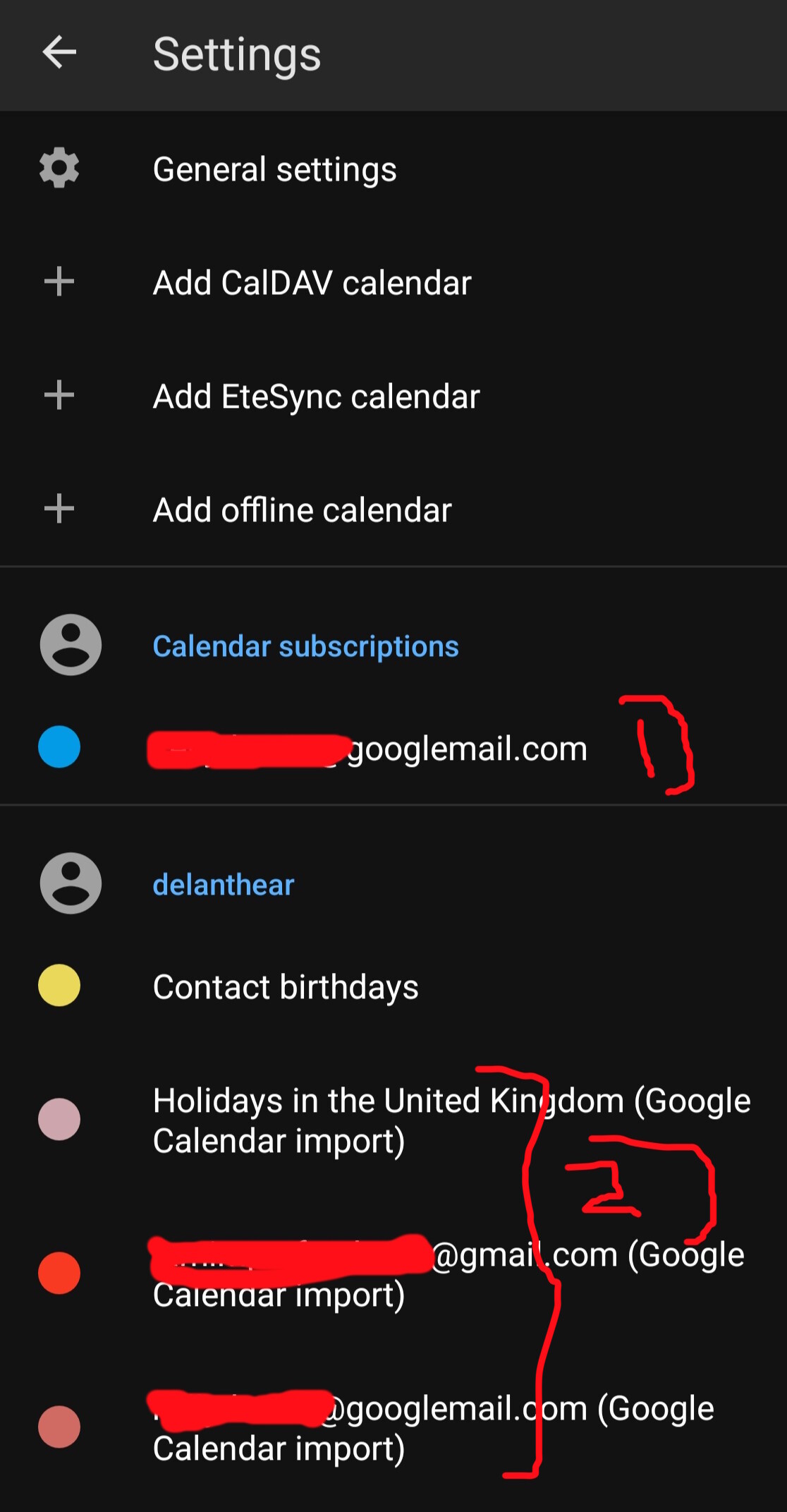
A bit confused, I then discovered the “import” settings in the web interface and tried this. This has imported 11 google calendars, and they appear in BOTH the web interface and the app. These appear in DIFFERENT locations in the app to the original calendar, see image.
I now can’t work out how to delete the calendar I added in 1) only hide it. It seems there is no interface to let you do this (or I need a special combination of swipes or something )
Meanwhile, calendar invites still don’t seem to be sent when I add an invite, either to the “personal” calendar, or if I add it to one of the “Google Calendar Import” entries.
Also, as a user coming from Google Calendar, you’d expect this to be a 2-way sync thing, i.e. if you add an event to your synced calendar, it would appear in Google, but it doesn’t. (I appreciate this might not actually be how it’s designed to work, but that’s probably people expect if they are migrating from shared Google calendars)
I think these are all fair questions because there is a significant expectation set that you can migrate away from Google to use Murena and it’s applications instead, so it needs to address these expectations appropriately.
What we have is a calendar system which seems to have 3 ways of adding different calendar which all work differently and aren’t sign posted well. It might make sense if you’ve ever heard of caldav I guess, but not to someone buying a phone from a company like Fairphone and pressing on the calendar app and expecting to be able to use it. We all need to be open to addressing the rough edges and making them smooth for new users if we want to improve uptake!
My main point still is unanswered though. Adding a calendar entry doesn’t seem to send any invites to attendees, which is a significant issue with a calendar app. Perhaps it’s just a new bug as suggested by Andywilliamsuk, but if is I’d think it was serious enough to need to be acknowledged as its core functionality for calendar applications. There shouldn’t be the concept of “a poorly formed calendar” when just using the official tools. It would be different if I’d hooked up a USB cable and poked around with the underlying data!
Also, it’s totally weird that I’ve managed to add something which is undeletable?!
(edit: replying to a comment which isn’t there now, but useful additional context)
I want to “unlink” it from my calendar app so it’s not in there, not delete the actual calendar. (It’s the one with all my stuff in in Google).
So @Delanthear you realise that this is a user forum. If, as a customer, you want to contact support you should use Contact Us.
I think it is possible that this mismatchcould happen if the Google “Web Calendar Management Account” could get added to your phone as a local calendar.
How could this happen?
The Google “Web Calendar Management Account” is unknown to me also what was the secret link method.
We could explore the above.
Advanced fix, only if you understand the logic of this suggestion.
I guess you would have to be sure where all your actual data is. You would need to be fairly certain that the Workspace account accurately reflects your data so far
and that you have some awareness of the eDrive sync mechanism
then you could consider Reset the Calendar storage on phone.
Settings > Apps > All apps > Calendar > Storage and cache > Clear storage.
I would be inclined to do this with the phone fully offline and without changing anything in Settings > Accounts during the fix.
Check the calendar on the phone to check for “empty”. Now put the phone online, and preferably wait a while so that you do not react to something which is just a delay in the sync process.
Please do not mess with your Murena account at the same time.
Yep. I wanted to make sure I wasn’t just doing something dumb before contacting support. Then it’s there for others too to see.
Yeah, I already tried this. Going into airplane mode and clearing Storage (and cache just to be sure) on the calendar app doesn’t clear the calendar entries. It also still has all the calendars linked under my username (the correct ones) and the “calendar subscription” the incorrect one.
Yeah, it’s really frustrating I can’t remember quite how I added this.
If you go into your Google calendar, you can get a secret link which allows you to share your calendar with another system. To find this you go to:
Google Calendar setting
Settings for my calendar"
Select the calendar you want to share
Integrate calendar
It then has two options, a url to an ics file for your calendar if it is public, or another where it generates you an ics link to use to allow access without making your calendar public. With this link you can see the calendar.
I just went into an event which DID NOT sent invitations to the attendees and shared it. This requested an app to share (I chose Thunderbird). It created a draft email with the ICS attached. I sent it to an unrelated Google Mail account with an attached Google Calendar. When this email was received, i was able to import it correctly into the calendar.
So, it all seems to work, just that the invitations to attendees aren’t sent. (for me at least!)
 )
)


