**how can I import a csv file into e/OS/ contacts?
ps. Why is this so difficult? Am i missing something. I didn’t even found a topic**… 
**how can I import a csv file into e/OS/ contacts?
ps. Why is this so difficult? Am i missing something. I didn’t even found a topic**…
Contacts app > top left 3 bar menu > Settings > Import > Import from .vcf file.
Others have had problems where the .vcf has wrong version or currently an issue with the format of each entry. Search
Do you indeed have a CSV file? In that case the problem is the unknown format of this file. It contains just words and numbers on lines.
Contacts are normally stored in a VCF file which is a text file having a concrete well known structure. You can create a VCF file from your contacts on a PC for instance using Thunderbird or Outlook.
msft really wouldn’t do vcf export: Import and export Outlook email, contacts, and calendar - Microsoft Support
(@aibd the cited thread was solved when murena updated its nextcloud contacts plugin)
I see csv2vcf / vcard scripts kicking around, but not something that’s exactly made for the csv header columns as hotmail/outlook will export.
This here has a simple approach and uses no dependencies, will run on anything that has python3: you’d configure the column order and key in a json mapping given to the script - GitHub - mridah/csv2vcf: A small command line tool to convert a CSV file to VCard (.vcf) · GitHub - it’s explained in the readme. (use the converter posted below).
Sometimes when doing *.csv imports it’s a bit tricky. First export from hotmail and then open the .csv file and see where the data is in columns and such. Now do the same foe an eOS exported contacts. Notice the order of the data in the columns. If the Name/Address/Phone number and so on are in a different order. Cut and paste the data from the Hotmail into the correct columns of the eOS file.
Unless they have set a standard. But the hole point is to compare the data types of the two CSV files.
Yeah, but some people have 200 or even more contacts …
I just did an import of a Hotmail (actually a “live” account). They have way to many columns, I count 61 of them.
But I am only interested in the first name, last name, email address and the phone number. They are in Hotmail CSV in columns A, C, I and P respectively. All than needs to be done is manually select each column individually and past it into the corresponding eOS contact files column.
I would not attempt this on a phone, but on a PC it is a breeze. I just did it in LibreOffice Calc.
that was something i was afraid of. So silly in the year 2026 
yeah, will try this one but not userfriendly. not your fault offcourse
Outlook doesn’t support VCF export and Thunderbird can’t switch collumns to match keys…
unfortunataly I have only a csv file
yeah, only a name not even a firstname, lastname nor mobile, home, work, adres and a nickname, really?
sorry, a bit frustrated
can you give this a try? it has csv-to-vcf import mapping profiles, one being “Outlook”. You can find it in AppLounge.
if that fails, I did test this successfully:
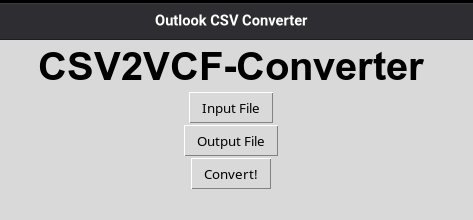
this is made for the Outlook format (as found here). Its output imports in murena.io / nextcloud contacts app and the Android app if there’s no web interface.
GitHub - M0r13n/CSV2VCF: Python Script for converting .csv contact files to .vcf. · GitHub
if you’re unfamiliar with git, use the green <> Code dropdown button in the upper right and choose “Download .zip”.
If you’re on windows and not on mac/linux, install Python first: Python on Windows for beginners | Microsoft Learn (probably use manual install through the appstore).
Navigate to the directory, run python3 __main__.py and you’ll see this (it can also do cli-only with -in / -out switches).
But the OP made by witchcraft a file which contains lines starting with “MS_OL_” - what should the letters “MS” and “OL” mean in your opinion?
I have found an easy workaround, not very ethical but using Hotmail for years i could live with it.
I have installed Outlook app. on my smartphone
synchronised the adressen book, activated the adresbook in LineageOS (Murena) contact app. (Or was it viceversa :-p)
In Outlook app i could export as csf file. Stored the export in “download” folder on my cellphone.
then open Contacts app and do the import.
Delete Outlook app and waited a couple of minuten to let it syncronise.
Done
PS. One drawback, formatting off the telephoneno. is not always perfect, but that way i could easely export 1000+ contacts tot my new phone on LineageOS. And above all everything is back, all contacts with all the data
Me happy
Thanks for all the feedback
This topic was automatically closed after 30 days. New replies are no longer allowed.