I am desperate for help. I have spent two days trying to import contacts to my new Fairphone Gen6 /e/OS
Regain your privacy! Adopt /e/OS the deGoogled mobile OS and online services
I am desperate for help. I have spent two days trying to import contacts to my new Fairphone Gen6 /e/OS
Regain your privacy! Adopt /e/OS the deGoogled mobile OS and online services
Hi @Alastair welcome to the /e/ users forum.
You would have to tell us what you tried and what errors you saw. A forum search will find others encountering this.
It should be simple if you have a valid .vcf exported from another system which you can import into Contacts app on the phone. Valid can include .vcf version; expected OK are 2.1, 3.0, 4.0.
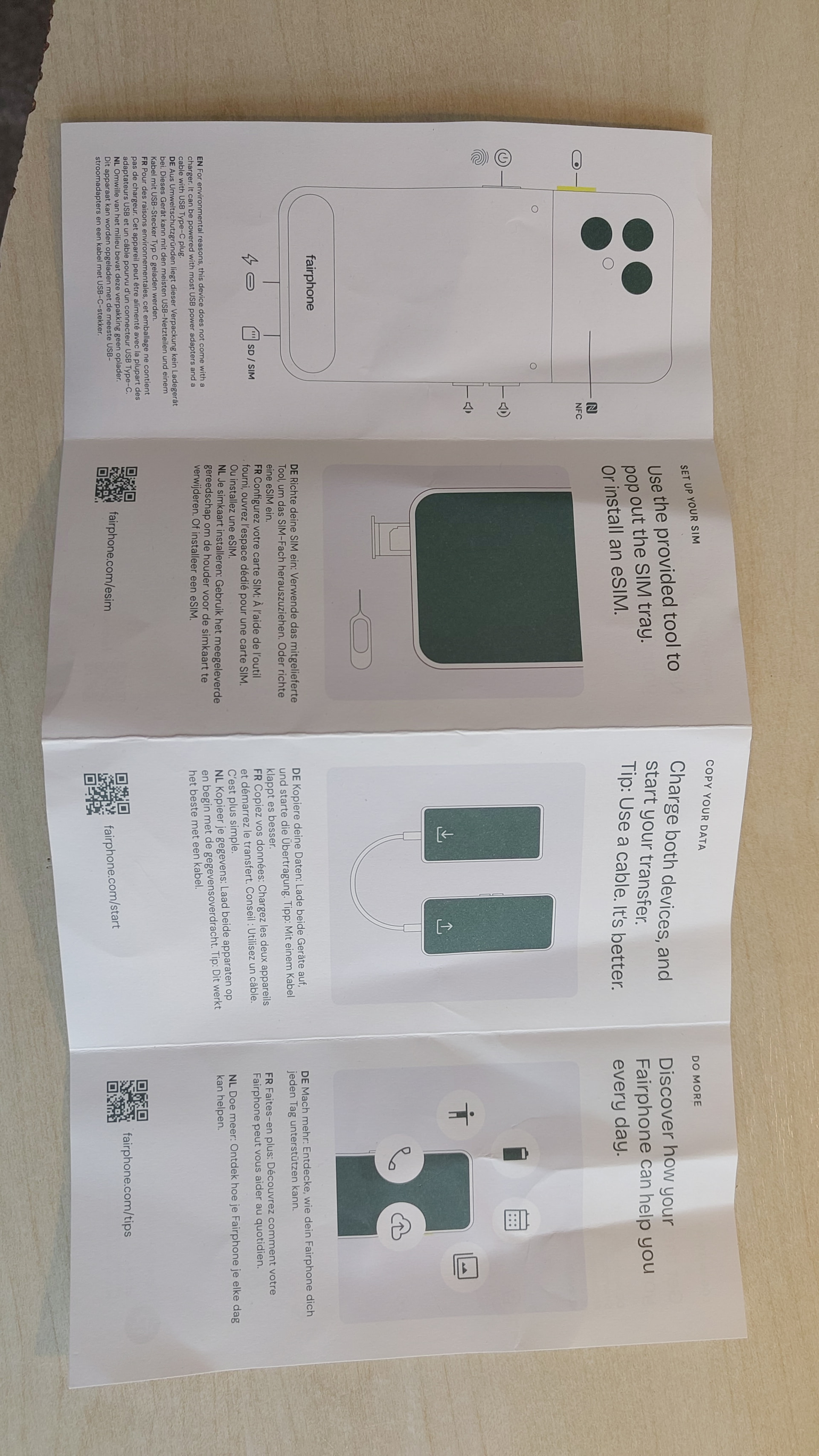
Hi, Thanks for your response. I have tried everything. The phone came with a quick start guide telling me to plug my old phone into my Fairphone. I spent hours trying to move data, and nothing happened, no error, but no transfer of anything. But in the end, all I need to really move is my contacts. I tried following the instructions to use Google to send to my Murena account, but no success. I put all my contacts in my old phone on my SIM, but in the new phone, I cannot see anywhere to import them from the SIM. Can you direct me to online instructions? All the instructions I have tried to follow do not match up with what I see on the screen. How do I send .vcf files to the new phone?
Alastair
This has been reported before (a screenshot in /e/OS would be helpful as this would be a Fairphone bug) however the Google method to “transfer all data to a new Android” with a Google a/c is not available on /e/OS. On this subject how did /e/OS become installed?
Back to your issue.
This seems to cause issues, so if this does not work please describe where your experience seems to diverge.
Please open Contacts app > Top left 3 bar menu >
At this point do you see Device? (Device = SIM) Your contacts_on_SIM are expected here.
Moving on from the above screen … Top left 3 bar menu > Settings > Contacts to display > Ideal is “All”
Assuming still no joy > Tap Contacts to display > Customise  > Device drop down > All Contacts
  > SAVE.
An observation, possibly full support for contacts on SIM is no longer fully supported in higher Android versions.
I can come back to a plan B, but if you get to display contacts on SIM=Device then you will be able to export as .vcf from Contacts > Settings > Export. Now you have a backup.
Then, as another job, you can import your .vcf to your account within the Contacts app.
For a new user (if no SD card to transfer to, easiest) once email is set up send as an email attachment.
Hi Aidb,
I have succeeded in importing contacts from the SIM with the contacts app, but I had to go to settings.
/e/OS was preinstalled. And it now makes sense that Google’s method to “transfer all data to a new Android” with a Google a/c is not available on /e/OS, but there was no indication of this with the new phone. Quite the opposite, it implies that everything will be transferred, just plug it in. After an hour of trying, I started to realise that this was probably not feasible, because it is not Android, but I need my contacts. I think the /e/OS intalled Fairphone should arrive with more explanation about the set-up and what can be done and what can’t. Or one should be directed to a clear online source. I could not find anything online that made sense.
I have gone back into the contact app and exported .vcf file, but this appears to just save them to the phone, not back them up off the phone. When I click on share contacts, it says they are exported, but to where? When I go to my Murena account, it is empty. Surely I can now export contacts to this account and all new contacts to be saved in this account? When I go into the Murena workspace, my contacts are empty and when I use the option to import contacts from a local file, it offers camera or media picker. If I click to import from files, it takes me nowhere of use.
Possibly now I see I have a Murena email that I could send them to, but how do I save them to the cloud?
Kind Regards
Alastair
Is bad … but leaving that aside.
Agreed, You can choose to save them a folder of your choice, or to SD card. “Export” in this context means export from to app (only).
Look out for the Notification and check Notification history. Export as ,vcf file I would prefer.
This is expected to happen (after sync completes) if you successfully added your contacts to the Contacts app.
Your Contacts app will backup automatically when “sync to account” is fully set up. How does eDrive sync work? [1]
This should also allow you to understand how your “backup .vcf” on phone could also be backed up to cloud.
[1] Image of Settings > Accounts > your account:
Thanks for your helpful responses 
I hope all continues well with your onward /e/OS journey 
Returning to
This is an example Need to restart data migration process on FP6 of an assertion that “Android Switch” was seen on /e/OS but it is not clear (to me) if this is seen in /e/OS First Start Wizard or where.
Reinterpreting a different thread, might it fit with your experience that as you unboxed a Murena Fairphone, you still saw a printed description that would accompany a Fairphone’s Android OS Fairphone showing how easy would be “Android Switch”. Such printed material is inappropriate (imho) in a Murena package without the inclusion of a printed “divergence” enclosure. Or did you experience “something in the software”?
Hi
I presume the card in the box was intended for an Android Fairphone, which is a silly mistake, and in all due respect, I was also in a hurry. Also, if I remember rightly, the startup did not tell me to plug into my old phone; it was the card in the box that prompted this action. In hindsight, the transition for me was not that painful, because I only needed to download a few apps and transfer my contacts. I will move my old photos to a hard drive. But when I could not work out how to import my contacts from my SIM, I started to pull my hair out . But all is good now, and my phone is syncing with the Murena platform, and I will embark on making the transition to Murena email. The Microsoft Authenticator app is working, which is a relief because I need it for work. I am undecided whether to bother with the workaround for Android Auto. It would be great if e/OS builds its own. The Fairphone connects to the car for hands-free calls and plays music. I will give Magic Lane a whirl at some point.
glad things worked out. The contacts import is the most critical step and depending where users come from, not straightforward. It’s only easy if you’ve done it often.
I was looking for photo evidence to ping manoj to make sure they do not include or at least modify that card in the boxes they send out. Makes for confused users, confused forum
Hi
I would send the photo, but I am now locked out murena desktop on my laptop and the murena account on my phone and cannot find a way back in on either. On the laptop, it sends an authenticator code that never arrives. And the phone will not accept my password, which I know is correct. I can’t even access this forum on Firefox; I am having to resort to Chrome, which is ironic.
Hi
I managed to get into my accounts. My fault, I installed the Aegis app and did not think to look there for the authentication code. Here is the photo of the card in the box. However, I am now thinking that plugging the two phones together should have allowed me to transfer contacts and pictures, but it wouldn’t. It went through motions asking which phone should have control and which direction the files should go, but nothing happened. One caveat is that the problem may have been with my old Android phone.
I cannot believe that this could possibly happen without a Google account being involved.
(I hope you will feel it appropriate @Rik if I ping you.) I don’t think we asked @Alastair whether this was Fairphone or Murena supplied but either way it is very confusing for new users to receive this documentation with an /e/OS phone.
My memory is that there have been a number of forum posts from new users starting their /e/OS journey from information “at first use” saying migration is done in a couple of clicks.
When I had to transfer contacts, I used Fossify Contacts.
I have made an export of all contacts in VCF file then imported the file in the new phone via same app. Transfer the vcf file via mail for example. Define import contact in default account : Murena. In that way they are synchronised all the time and when I swap the phone, put in my Murena account and everything is OK.
Hope it helps you.