Wrong APN settings Telia Norway

I wasn’t able to connect through mobiledata alone on Fp6 with /e/OS, after some reading here and inquiery, I found out that there were preinstalled wrong APN settings for Telia in Norway.

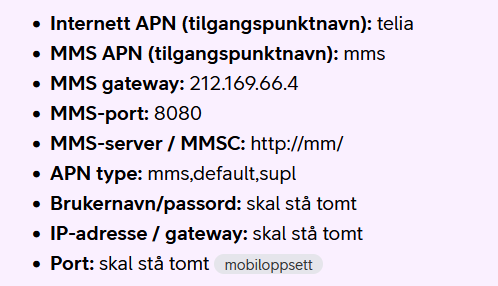
Attached screenshot of the right ones:

Regain your privacy! Adopt /e/OS the deGoogled mobile OS and online services

1 Like

Would you be able to confirm that this page is correct https://apn.how/no/telia?

This shows this information:

Telia MCC-MNC values
242-02

Edit.
The page was actually wrong … 242,02 incorrect. So I am (later) deleting misleading information


With good documented evidence of the correct values in Report an issue it may be possible to get a change.

[1] NO.xml · develop · e / os / android_vendor_apn · GitLab

Sorry for the late reply. I am new to all this and a week ago I did not even know what APN means… But I did some some digging, research …. so these settings I posted, are the ones I found, and are the settings Telia provides on their homepage (https://www.telia.no/mobilabonnement/hjelp/mobiloppsett/ ) and their custom-service confirmed - and they work.

Question 1: confirm … is this page is correct https://apn.how/no/telia?

As far as I can see (and according to Telia’s homepage), these settings are right, except Telia gives the APN type as only: “default, supl.” and not as “default,ia,supl.”

Regarding the settings you posted:

You posted right MMS settings but wrong Internet settings, the very same which I had preset on my FP 6 (/e/OS v3.7.3):

  • carrier: Netcom

    apn name: netcom

    proxy: 10.254.254.10

    port: 8080

    APN-type: default, mms, supl

    APN-protokoll: IPv4

    Roaming
    protokoll for APN: IPv4

The right Internet settings are:

  • carrier: Telia

    apn name: telia

    proxy: leave blank (delete 10.254.254.10)

    port: leave blank (delete 8080)

    APN-type: default, mms, supl

    APN-protokoll: IPv4/IPv6

    Roaming
    protokoll for APN: IPv4/IPv6

  • Screenshot from Telia’s homepage:

additionally, They gave this:

I will try the link to the Report an issue, see what they find out …

1 Like

Thank you for your work and contribution to the project.

Thanks for confirming that and for the Telia actual page (clearly more useful than the ApnHow which I found).

In your “Report an Issue” only the text based and verifiable sources are required for a dev to patch a replacement.

I am not fully certain but I expect any /e/OS update will revert your APN until this is fixed. I think that if you have added (rather than edited) your new APN data, it will not be overwritten, but the previous selection may be used

When your report has been made, I would be inclined to add to the report later if things change at update.

@aibd Iam tryjng to report the issue with the link you provided, but I am unable to log inn. Do I need a special account for this GitLab Enterprise Edition, because my normal login is not excerpted.

I’m afraid everone has the same problem. The link itself contains a paragraph Getting an error message in new ID creation on /e/OS Gitlab?. Did you already open a murena.io account? That email will work.

  • This error occurs because we limit email domains for registration to prevent fake accounts from overwhelming our servers.
  • If your email is not allowed, you can create a Murena Workspace account here and register using your Murena email.
1 Like

@aibd thanks for all help, I think I managed to report the issue as you said.

1 Like