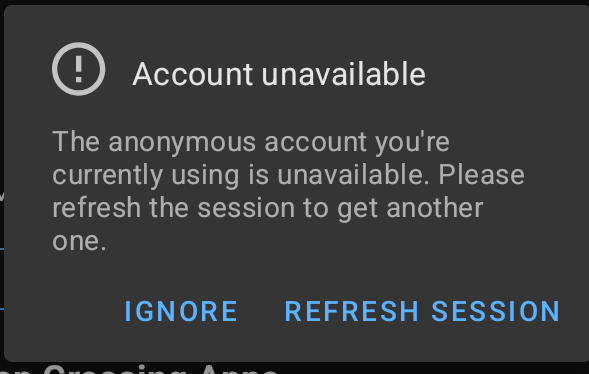
Since at least a few hours I am unable to install apps via App Lounge, I also constantly receive the error on my screen the anonymous account is unavailable when I launch Apple Lounge. I can see apps on the home tab but whenever I click an app I end up in a black screen with the mention of “Unknown error”
the anonymous account uses a pool of tokens (Aurora uses the same technique, but its own pool). If it’s operating on close to capacity there’s times when no tokens are available, thus the feedback is so mixed.
This is the risk in using Google Play Store directly.
I’m still experiencing the issue of not being able to log in anonymously. I’ve tried logging out, clearing storage, etc. The problem started yesterday and persists.
@tcecyk Your explanation makes sense. It seems like a likely cause.
Same for me. Usually i can fix it by using hide-my-ip feature, or switch to mobile net, but now it does not work. Tried clear app storage multiple times as well.
If this token pool is the problem then who can solve it? I dont fully get the idea tho.
App Lounge not working for me this morning. I am not spamming App Lounge with more requests. The FAQ does mention “Try later”.
I am doing as, including reboot and wait …
So this is now “Later” and the response is as
As this happens after >4 seconds of animated blank screen on opening App Lounge, I read this as App Lounge itself is too busy, speculation, with other peer’s failing requests.
I will be back to “Try Later”, meanwhile meet immediate need with F-Droid or Aurora store.
Yeah ok, i can wait of course no problem, thanks for reassuring. App update is rarely urgent and Aurora store is there indeed as backup.
Btw If the mentioned token pool is small then then it might need some expansion.
I thought of reviewing my comment … to ask @tcecyk do you think the collection of a token might have been required as early in my session as I describe?
Does being assigned a token start as early as starting an anonymous session?
… as early as seeing an animated blank screen for an extended period?
Post Script. By late that evening now seeing only ~2.5 second animated blank screen at opening App Lounge, I started another run of
@aibd I’m short on time to dig into what screen corresponds to session and login state. If you want to read the source, look what calls this classes login().
Roughly: category and search is token-less, but apk fetch ofc authenticated. If you look at recent repo activity you see what AppL struggles with.
Imo this commit from June takes its toll on the token-pool, but it was required to return accurate results. Also some caching got removed again (while developing better caching). All in all a hard bargain. I don’t envy AppL devs because they query a backend they do not control.
(as to token pools, Aurora calls it “token dispenser”, here’s more info on it… I remember /e/ had a doc post on it too, can’t find it)
Imo anyone struggling, take the time to create a bogus Google account for yourself. Token dispensers are a neat hack, but they’re a hack. Apk mirrors are the more sensible solution, but they need independent certificate observatories (think CT logs) so users stop being chickens about them.
Same issue here, brand new Fairphone 6, 1 day old. Cannot install any apps. If this issue is not resolved I will have to return my new purchase. Does not spark much confidence that this issue seemed to happen months ago already and is still popping up.
If you are willing, create a Google account without any info on it, that you use for only App Lounge.
I had troubles with anonymous mode on App Lounge, too, most probably because of the token pool problem described some posts above. Since I use a dummy Google account, there are no problems anymore and since I just need a burner email for that and nothing else it is okay for me in terms of privacy.
I tried and unfortunately the problem is still there. Although I’m able to download some applications, there are some that cannot be downloaded. It’s apparently not a problem of account and App Lounge or Aurora are behaving the same in the end.
It’s quite severe I’d say and I already joined a Gitlab issue about this problem.
In a nutshell: the issue is only there for those who moved to e/OS recently, as far as I can judge from my tickets reading. There’s something fishy around the terminal registration which doesn’t relay the correct platform type, it seems.
Thanks. I dit it already inside the Gitlab ticket.
Snapchat & Signal for instance, cannot de installed, while WhatsApp can.
In every attempts it indicates “v0” because the version of the App cannot be determined, apparently.