im want to install e/Os on a Pixel 7 Build ap4a.241205.013
The latest stock ROM Update on Android 15 has been performed,
also the boot loader unlock has been performed according to:
But when performing the step “Install /e/OS“ according to the instruction in the above mentioned link, the adb sideload stops with several errors, in short:
-footer is wrong
-signature verrification failed
-error 21
Googling Error 21 points out to the error, that for flashing the IMG-e-3.6-a15-20260312593772-official-panther.zip a custom recovery tool might be necessary.
In the above mentioned link there is no indication of the necessity of a custom recovery tool,
I think my Pixel 7 still has the stock recovery tool.
@piero Thank you very much!
I will check that tomorrow.
Outdated documentation is never a good thing and can lead to hard-baked bricks.. @Manoj tnx too!
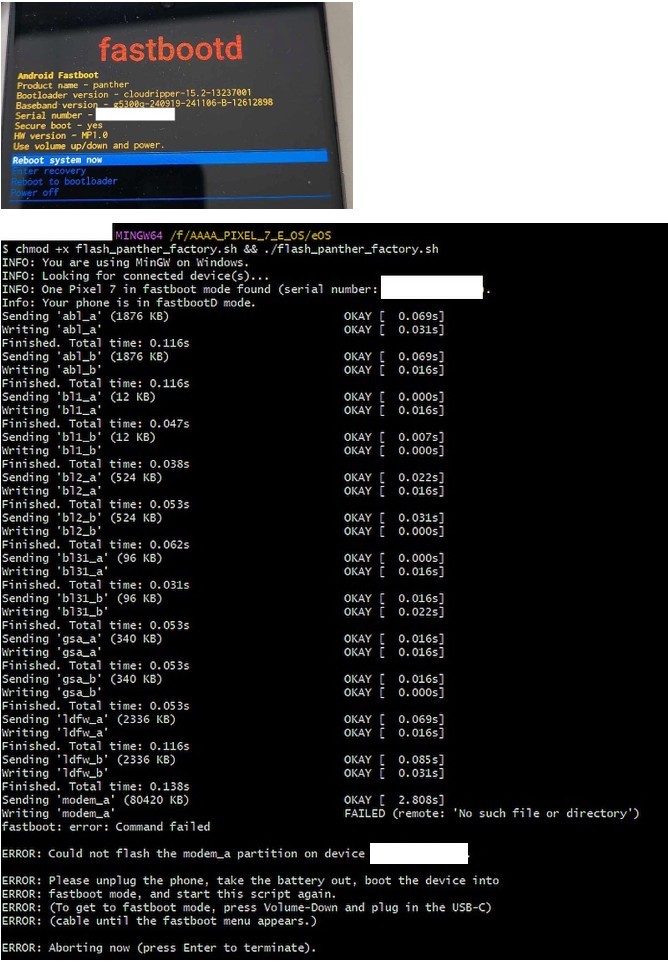
@piero: tnx, that was the right clue: fastbootD mode is not fastboot mode.
using the (normal?) fastboot on the pixel and the Gitbash on the Windows PC with command: chmod +x flash_panther_factory.sh && ./flash_panther_factory.sh
works like a charm
So now the e/Os is installed and the device seems to boot.
I will report later, if everything works.
Do I have to wipe any data again?
Later I want to relock the bootloader again.
Any hints for that?
Luckily I decided to relock the bootloader right now.
It turns out, that all user data and all accounts will be deleted in this process.
No problem for me in this case (I did not install or configure anaything up to now), but an additional note in the bootloader relock section would be nice.
Maybe this will help someone prevent a tragedy
I was able to install E/OS on my pixel 7 with the guide. Make sure to flash the phone to the earliest version of stock android 15 to avoid security patch errors. E/OS is only running Android 15 while stock android is 16 with a higher security patch. Look at the E/OS support page for roll back option. There is a flash link to the earliest version of stock android 15. Thank you!
Pixel 7:
latest official e/Os: Android 15
latest community e/Os: Android 16
I preffered to install the latest official e/Os = Android 15.
The stock ROM on my before installing e/Os Android 15 was also Android 15.
I wonder, if there will be an official e/Os Android 16 later.
best regards
My pixel 7 was running Android 16. The security patch was beyond the official ROM. I am aware of the community ROM. I wanted to only mention the official version.