Marine
January 20, 2026, 3:52pm
1
Hi,
I am using a samsung galaxy s10e with /e/ for several years now.
Yesterday I tried to upgrade to /e/3.1.4 (I am now running /e/3.1.1).
However my phone froze during the set up (black screen, white “e” and loading bar). As I couldn’t do anything, I let the battery discharged at night and I could turn it on in the morning with my last OS running.
Has anybody got this kind of trouble?
piero
January 20, 2026, 5:21pm
2
Marine
January 20, 2026, 5:42pm
3
No idea ! My OS was offering me this update only.
Marine
January 20, 2026, 5:56pm
4
Can I have some help upgrading to /e/ 3.4 ?
If I refer to your post [HOWTO] Upgrade my /e/OS to major Android version without loosing /data
my phone was running android 12 but I had to downgrade it to android 11 https://community.e.foundation/t/how-to-install-e-r-on-a-samsung-galaxy-s10e-already-running-android-12/38881
I don’t understand question 2 sorry
Do you have any idea if I can do what you call the dirty upgrade?
piero
January 20, 2026, 6:17pm
5
What was the android version of the StockOS installed before /e/ ?
.
What is the latest available StockOS android version but not higher regarding to the android version of the /e/OS build you want to install ?
according to Install /e/OS on a Samsung Galaxy S10e - “beyond0lte” :
.
so : yes.
.
does Lineage wiki offer a firmware upgrade solution for this device ?
Update firmware on beyond0lte | LineageOS Wiki
so yes, but uneeded because answer to question (3) is yes.
.
CONCLUSION :
Marine
January 20, 2026, 6:30pm
6
Thank you so much ! It’s difficult for me to understand all of this
I’ll try soon !
@piero Is it still possible to get a bootloop? Or if the phone can’t do the update, I will still get my old OS?
Juste worried that my phone freezes again !..
piero
January 20, 2026, 6:53pm
7
please make propositions, i will be happy to integrate them to make the guide clearer.
i cannot answer other than “it is not expected”.
it is always advised to take a backup in case…
Marine
January 22, 2026, 8:26am
8
I am not sure how you could improve it ! I feel it is like learning a new language, it takes time and some effort…
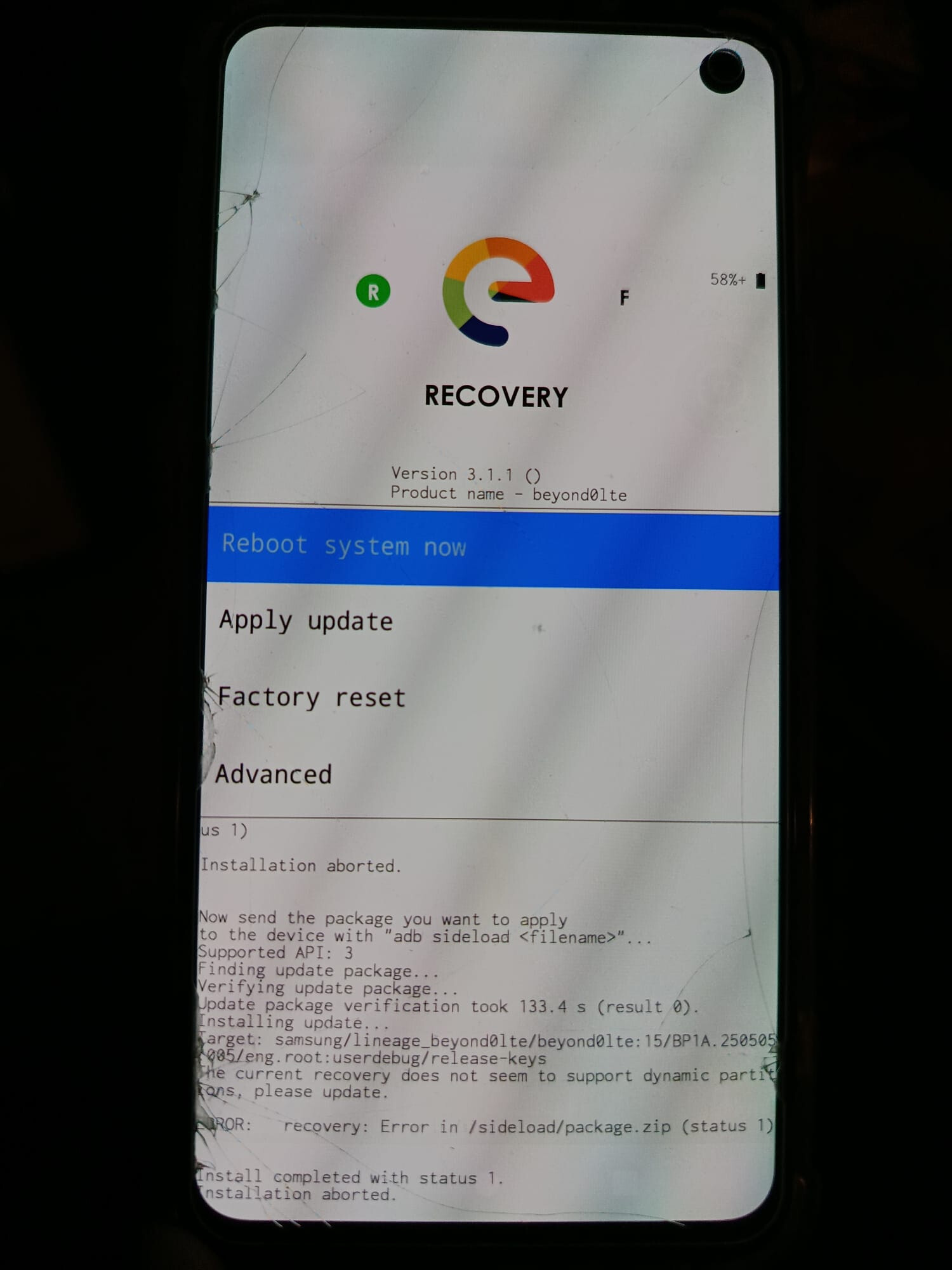
I tried the dirty upgrade but I got this recovery screen (I wasn’t expecting it). Shoud I follow the steps of the“Universal Method” you described? I am confused!
I tried apply update but I just have as only option “apply from adb”
piero
January 22, 2026, 10:25am
9
option (1) (don’t need a PC) should work on a device running android 13 based /e/OS…
option (2) and (3) (don’t need a PC) not all devices have the feature…
option (4) (need a PC) works in all case…
download the file on the phone, go to “→ settings → system updater” and use the feature called “locale update” (if you have it in the “3 dot menu” at top right of the screen).
or
download the file on the phone, reboot the phone into the recovery mode and use “apply update” then “from internal storage” (if your “recovery mode” have the feature).
or
download the file on a SDcard, reboot the phone into the recovery mode and use “apply update” then “from External SDcard” (if your “recovery mode” have the feature).
or
Universal Method
Marine
January 22, 2026, 11:46am
10
I did the option 1 but while rebooting, I got the recovery screen. Weird no?
@piero should I follow step 4 ?
1 Like
Marine
January 22, 2026, 4:14pm
11
Ok So I tried to follow step 4 …
@piero I am panicking….. I believe I forgot to enable debugging on my phone … But on your /how to/ you didn’t recall how to access recovery mode and I probably did it the wrong way…
piero
January 22, 2026, 5:26pm
12
i just corrected that point in the guide…
i don’t know, you will need to try.
Marine:
@piero I am panicking…..
if it don’t boot, i have an idea…
.
(also i see on your phone screenshot that “recovery-e need to be updated”)
1 Like
Marine
January 22, 2026, 6:51pm
13
Ok so I rebooted and fortunately I still have my old OS… But I am not confident at all in trying to upgrade again … I really don’t want to formate my phone. It’s not that “easy upgrade” after all
What should I do about it ? How do you launch e-recovery?
piero
January 22, 2026, 7:06pm
14
i reconise a “Windobe” screen,Odin3 ” to upgrade your recovery to “recovery-e-3.4-a15.tar ”
In the following guide, where it is noticed TWRP, use your new recovery-e instead
Put your smartphone in download mode (see above how to do this).
Connect your smartphone to your computer with a reliable cable .
If nothing happens, it means your computer doesn’t have the necesary drivers. So you need to install them, by following the steps of the following 7) part. Sometimes you just have to wait a few minutes that Windows install them automatically.
in the “Options” tab (between “Log” and “Pit”) untick the “Auto-reboot” box.
Click on “AP”, then select the TWRP file in .tar format previously downloaded.
Click on “Start” to start installing TWRP on your device. It will take a few seconds. Once finished, Odin will display in a green box “PASS”.WARNING :
.
…NOW COMES THE CRUTIAL STEP !..
To get out of the Download mode you must Force Power Off your Samsung device,Volume Down + Power .
…IT IS THE CRUTIAL STEP !..
immediately Boot to Recovery before any other boot mode attempt,Volume up + Home + Power Power when you see the very little blue line in the top of the screen…
…IT WAS THE CRUTIAL STEP !..
.
Install the necessary drivers if needed
In order for your smartphone to communicate with the computer, and therefore be flashed, you must install the necessary drivers. (If you have already successfully installed TWRP, skip this step.)
Download them directly from an unofficial source .
Unzip the downloaded directory.
Open the unzipped directory created and launch the utility (the file ending by “.exe”).
Click on “Yes” in the Windows warning message and follow the steps indicated.
Marine
January 23, 2026, 7:12am
15
Why can’t I use the Universal Method ?
Is it going to erase my data?
piero
January 23, 2026, 9:20am
16
From your previous attempt, result the need of upgrade the recovery prior, then use it to upgrade /e/
As already said : do not apply any “factory-reset” nor format /data partition otherwise you will loose your data.
piero
January 26, 2026, 9:40am
17
No news, good news ?
Marine
January 26, 2026, 9:54am
18
Hi !
I won’t forget to tell you if it worked or not once I tried…
system
March 21, 2026, 3:52pm
19
This topic was automatically closed after 60 days. New replies are no longer allowed.