Version of /e/OS or Stock which existed previously : 1.21-t
Is the device Rooted / Not rooted : Not Rooted
Went smooth, looks great, works fine. New animations of closing an app is not always smooth as I would like (especially at the beginning of the animation there is a small visible frame drop), but overall no complains. Thank you.
vendor name : lenovo
Device name : YTX703F tablet
Device code name : YTX703F
/e/OS release which existed previously : 1.21R dev
Device rooted : not rooted
Update went smooth and is working fine. I was expecting new Bliss release takes into account tablet and portrait mode by default. Sadly It doesn’t, so I keep Ruthless laucher.
-2nd family device-
vendor name : Google
Device name : pixel 5
device code name : redfin
/e/OS release which existed previously : 1.21T Stable
Everythink OK so far. It seems that agenda multiple reminders stops. Good thing
eh, I missed that in my hurry to be excited… but I read them now and see that I have to install a bunch of google junk for it, so I’ll pass for now. My only goal was to have full spotify functionality (browse playlists etc) from the car but I switched to Murena to get away from google and I’m sticking with that decision.
Vendors: Fairphone, Samsung, Lenovo, Teracube
Devices: FP2, ex FPOS
         FP4, /e/ @ murena
         FP4, ex FPOS @ Fairphone
         FP4, ex FPOS @ T-mobile
         S7, /e/ @ murena
         YTX703F tablet, ex OS @ Lenovo
         Teracube 2e, /e/ @ murena
Version of /e/OS: All devices had the latest official and stable /e/-updates
Not rooted…
All devices are working properly.
All cell phones are using the “zim launcher”, the Murena-bought-FP4 uses a secondary working profile by “shelter” and dual-sim (two numbers, physical SIM + eSIM).
Vendor Name: Fairphone
Device name: Fairphone 3 and Fairphone 4
Device CodeName: FP3 + FP4
Previous Version of /e/OS: 1.21-s (stable)
Rooted: No
OTA Version: Upgrade to v2.0-t (FP3) Upgrade to v2.0-s (FP4)
AppLounge is not working when using a USB-C-LAN-Connector (up to v1.19. it worked flawlessly). Now a black screen says: “Connection not possible. Please check the Internet-Connection and try again”. Available Updates are still checked in the background and pronuced, but there is no possibility to dowload or install them. Also the search function for Apps or access any menue is not possible.
Thanks for help or fixing (pleeeease)
Cheers Liquid
Following an Android version upgrade App Lounge might benefit from Settings > Apps and notifications > See all … apps > App Lounge > Storage & cache > Clear storage. (No significant data will be lost but you will need to make a new login and agree ToS).
Samsung
Galaxy S7
SM-G930F
Version 1.21 R Stable-herolte
Not rooted
Hello,
the update went well. Just the next day my SD card was considered corrupt. I always make a copy of my card before updating, so I format and copy the data. I’ve had no particular problems for a week now. I’ve configured the Signal app to make its backups automatically and on the SD card, so I had to reconfigure this function. The next update I’ll reconfigure Signal just after the update and see if I get the same problem with the corrupted card.
Thanks to the whole team!
Since I updated /e/ OS to v 2.0 (update was OK and except this aspect, the rest seems to be working), I can’t send any voice message on any chat apps (Element, Schildichat, ElementX, Nextcloud Talk…).
When I tap on the mic button, nothing happens in the app. Time to time, I see a blue mic phone icon on the top of the screen telling me that the mic is supposed to be in use but in reality, it isn’t.
As my message has been moved here (and that’s a good thing), some informations (in title in previous message) have been lost :
Phone : Fairphone 3+
Android : 13
/e/OS version : 2.0-t-20240508399779-dev-FP
And I’ll complete with some new information :
it actually works on ElementX by tapping once on the mic button
on other chat apps (Element, Schildichat and Nextcloud Talk), it should work by keeping the finger on the mic button, register the voice message and send the message by leaving up the finger. This system doesn’t work.
Version of /e/OS or Stock which existed previously: update screen doesn’t show what the previous version was but I installed the previous stable version
New version: 2.0-s-20240506399550-stable-zirconia
Android version: 12
Is the device Rooted / Not rooted: not shown anywhere
No problem with the installation. Immediate and consistent performance degradation.
Pressing the square button usually shows the list of running apps, often it would only show one app but could be ‘scrolled’ as if several apps were shown. It looked like the thumbnail images were just blank. Tapping the running app, then the square button would fix it.
Noticeable delay in redrawing the home page after pressing the circle button. Sometimes I had to press it again.
Only one app can run at a time, switching to another app means the one I was using re-opens the next time I switch to it. An example is starting to play a program in Antenna Pod, then opening Firefox and trying to load a web page results in the audio stopping when the page is about 80% loaded. (Not always, but eventually the audio would shut off). Switching to Antenna Pod shows the startup logo and there’s a delay. Switching back to Firefox again shows the startup logo and the page reloads. Even switching between tabs within Firefox forces a reload. I know they’re being closed because I have to re-enter BitWarden’s master password every time I switch away from it.
More dangerously, this problem affects the Proton VPN app which will disconnect it randomly. I only noticed this because I used the option to block connections without the VPN. I was constantly needing to turn off the option, let the VPN app reconnect, then turn the option back on.
I tried multiple restarts an clearing the cache of the apps but it didn’t help. I also tried turning off at battery saving option and the ‘remove unused permission and storage’ to the apps. Eventually I shut it off and removed the battery which seemed to fix things.
Installed on 07.05.24, charging, display on, duration 58 min., worked flawlessly.
I still find the same camera issue as @outsidethebox in this post.
Anything else went smoothly until 19.05.24, when I recognized an inexplaineable battery drain from 70 to 3% (67%!) in 12 hrs 22 minutes. Here is the screenshot I did in the akku-app:
Vendor Name: Fairphone
Device name: Fairphone 4
Device CodeName: FP4
Previous Version of /e/OS: 1.21-s (stable)
Rooted: No
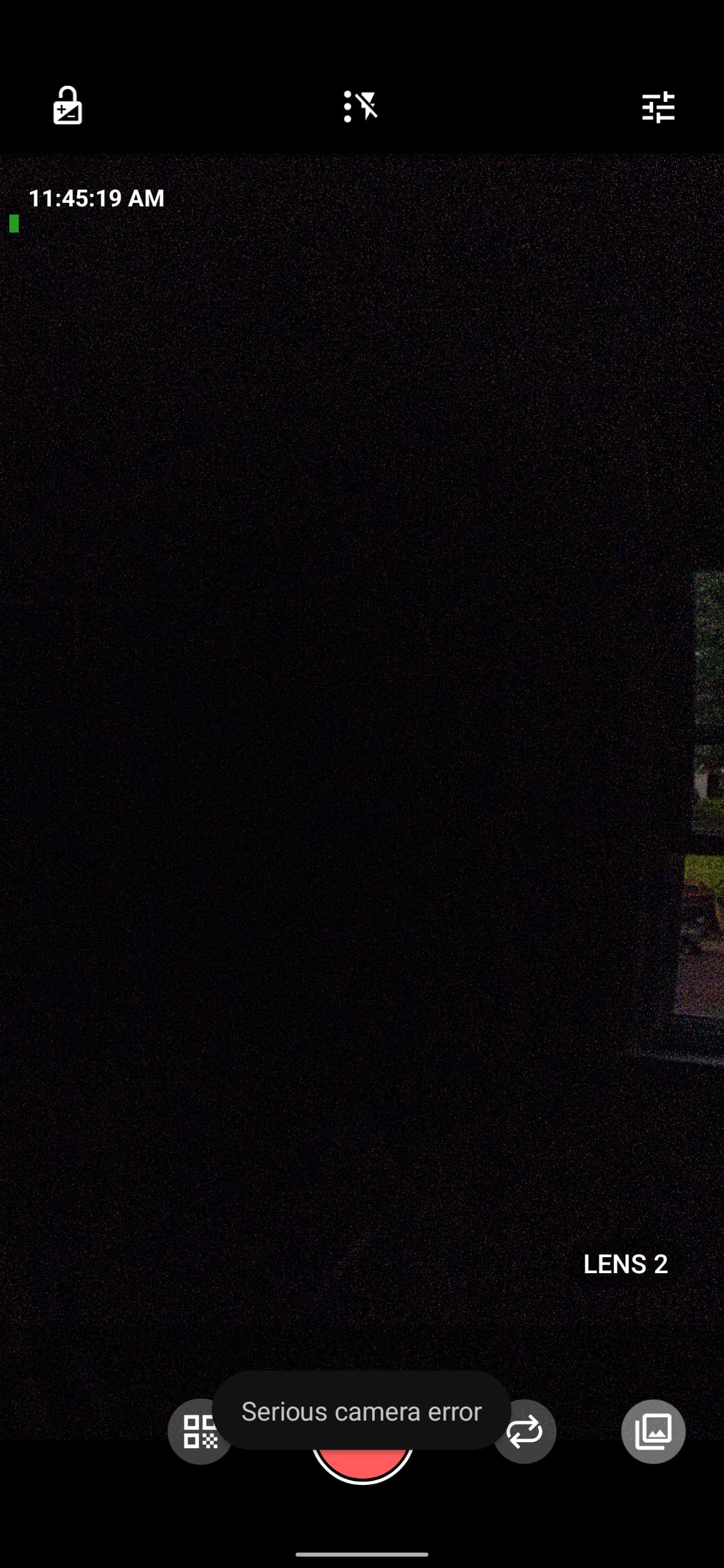
I don’t use my FP4 as much as another device, so I don’t have many customized settings. However, after the update, the immediate issue I have is with the camera in Video Mode, and selecting the Lens 2.
When I do that, My screen gets really dark (like an exposure thing) and super-laggy. And then at the bottom of the screen it says “Serious camera error” in a little bubble that goes away in about 5-7 seconds.
I recall someone else mentioning time lapse being an issue after the update. I have had issue with that as well. So I feel this update def affected my camera in a negative way.
Hi!
Some of us were experiencing the freezing of the camera that comes with eOS when recording videos. I have been testing and the camera works correctly if we make the following setting:
Camera Controls > Photo Settings > Allow photos while recording video → Do not allow (default is allow).
Tested with foundation.e.camera version 1.52 on e-2.0-t.