Hi, after trying to flash a new built of gta4xlwifi (Samsung Galaxy Tab S6 Lite) I am stuck in a fastboot loop. Whatever I do (reboot to recovery, bootloader, normal boot,..) all I get is a black screen with the message (in green)
Entering fastboot…
With linux fastboot it says
R52N40XRSSH fastboot
Where can I go from here? – I have run out of ideas, so help is appreciated. Thx.
Fastboot is not the right tool for Samsung device…
What are possible OS running on your PC ?
Model: SM-P610
Region: DBT
Model name: SM-P610 / Galaxy Tab S6 Lite
Model full name: SM-P610NZAADBT
Country: Germany
Product date: 2020-04-24 00:00:00
Device age: 2155
KG Registered: NO
Enable OEM unlock in the Developer options under device Settings.
It appears sometime that the OEM unlock option is missing from Development options, especially on new devices. Please connect your device to the wifi and check of system updates. After a reboot, the option should appear.
Power off the device and connect the USB adapter to the computer (but not to the device, yet).
Boot into download mode:
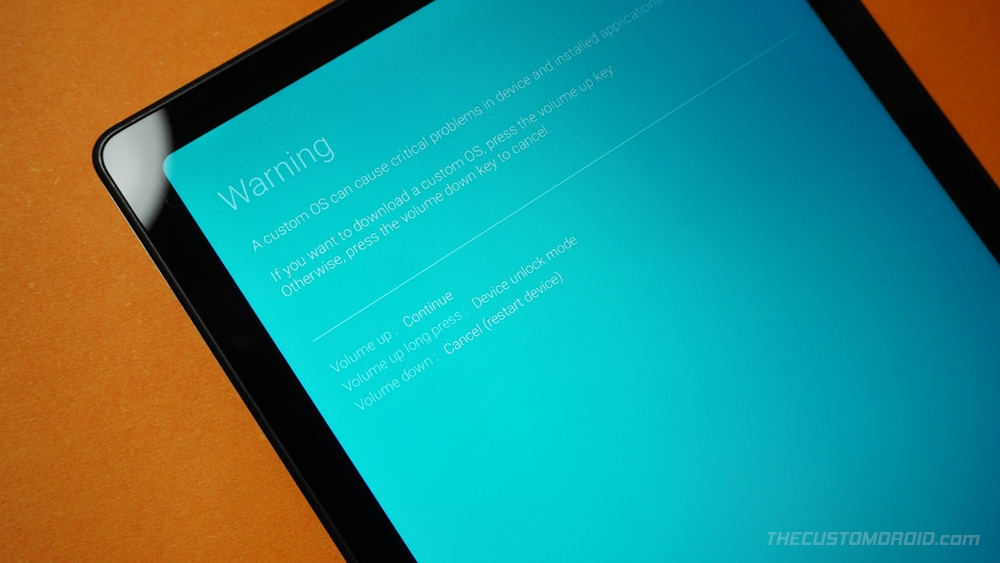
hold Volume Down + Volume Up and connect the USB cable to PC.You must accept/continue with the warning in “Download mode” to unlock the bootloader (see image below). You can accept/continue by short-pressing the Volume UP button. Then, connect your device with your PC if you have already not done it.
All I get is ‘Entering fastboot…’ on an otherwise black screen.
I am familiar with the download mode and have been able to get to it using the usual methods. No longer so: whatever I do now, it sends me to the above.
as I said, I cannot get back to recovery. Whatever key combination I choose, Power + VolUp, Power + VolDown, Power + VolUp + VolDown, they either don’t do anything, or they bring me to the black screen with ‘Entering fastboot…’.
Earlier this day, it happened that unsuccessful normal boot ups would bring me to the /e/os recovery, but after another flashing attempt from there I ended up in the described fastboot loop.
My experience of Dynamic partition “fail to install” suggests that this fallback to fastboot or fastbootd happens when loosely speaking the “partition map” within Recovery does not match the device as it finds it. Fastboot commands would allow “expert fix” by flashing faulty partitions.
Online search of this error suggests that a successful install of custom ROM on this device depends on the usual Samsung requirement for a “special trigger” to boot into custom recovery and overwrite Android recovery.
I think @gfritz that you would need to accurately identify where in the install the fail happened, was the e-Recovery ever seen?
Difficulties can arise when an unusual mix of partitions got changed by a combination of events over more than one install attempt.
Ok, while overnight the ‘Entering fastboot..’ screen stayed awake, I just pressed Power + VolDown as suggested by @piero, and guess what – this time it completely went silent, offering just a blank screen, or just the charging sign when on AC.
Is it dead now?
@pietro, you’re a hero! My device came back to life! – I was not aware that connecting to PC after pressing the buttons would have an extra effect. Thanks a lot!
Enable Developer Options by pressing the “Build Number” option in the “Settings” app within the “About” menu
From within the Developer options menu, enable OEM unlock.
Power off the device, and boot it into download mode:
With the device powered off, hold Volume Down + Volume Up and connect USB cable to PC.
Now, click the button that the onscreen instructions correlate to “Device unlock mode” and/or “Unlock Bootloader”.
Your device will reboot, you may now unplug the USB cable from your device.
The device will demand you factory reset, please follow the onscreen instructions to do so.
Run through Android Setup skipping everything you can, then connect the device to a Wi-Fi network.
Re-enable Development settings by clicking the “Build Number” option 10 times, in the “Settings” app within the “About” menu, and verify that “OEM Unlock” is still enabled in the “Developer options” menu.
My tablet is alive again. With your help, I have now managed to get my phone back to stock rom, and from that I should be able to flash a brand new /e/os now. Thanks again to all!
I have done the Tab 6 Lite WiFi. My wife uses it and loves it. It’s worth the effort to get it going. Just be sure there are no google account signed in on the device before you start.